Bioreports
Saturday, 8 Aug 2026
  • Home
  • POLITICS
  • SPORTS
  • HEALTH
  • BUSINESS
  • ENTERTAINMENT
    • Fashion
    • Fitness
    • Food
    • Travel
Newsletter
  • news
  • update
  • life style
  • tech
  • fitness
  • fashion
  • travel
  • food
BioreportsBioreports
Font ResizerAa
  • Home
  • Read History
  • Economy
  • Travel
  • Global Security
  • Global Affairs
  • World
  • Technology
  • Login
  • Blog
  • Contact
Search
  • Pages
    • Blog Index
    • Contact Us
    • Search Page
    • 404 Page
  • Pages
    • Home
    • Blog Index
    • Contact Us
    • Search Page
    • 404 Page
  • Pages
    • Home
    • Blog Index
    • Contact Us
    • Search Page
    • 404 Page
  • Personalized
    • Read History
  • Personalized
    • Read History
  • Personalized
    • Read History
  • Categories
    • Economy
    • Global Affairs
    • Technology
    • Travel
    • Global Security
  • Categories
    • Economy
    • Global Affairs
    • Technology
    • Travel
    • Global Security
  • Categories
    • Economy
    • Global Affairs
    • Technology
    • Travel
    • Global Security
Have an existing account? Sign In
Follow US
© 2026 Foxiz News Network. Ruby Design Company. All Rights Reserved.
Gadgets

These Keyboard Shortcuts Let You Control YouTube Videos Like A Pro

admin
Last updated: August 8, 2026 9:34 am
By
admin
Share
6 Min Read
These Keyboard Shortcuts Let You Control YouTube Videos Like A Pro
SHARE

Hands on laptop keyboard with YouTube logo on the screen

Thaspol Sangsee/Shutterstock

Arguably the most annoying part of watching YouTube is the controls. You always seem to end up clicking on buttons every few seconds — maybe to adjust the volume, skip to the last chapter, or change the resolution. It’s especially frustrating when you have to go digging through menus, which almost always cover the video in one way or another. Thankfully, there’s a better way to watch YouTube more efficiently: with keyboard shortcuts.

You might already use your keyboard’s built-in media keys to play, pause, stop, or go to the next video with a single button press. But beyond these keys, the plaform hides other convenient shortcuts that aren’t as obvious.

These powerful YouTube features make it easier to do actions like seeking the video quicker, switching to a different viewing mode, and even panning a spherical video. Once you learn these keyboard shortcuts, you’ll be using YouTube like a pro.

What convenient keyboard shortcuts does YouTube support?
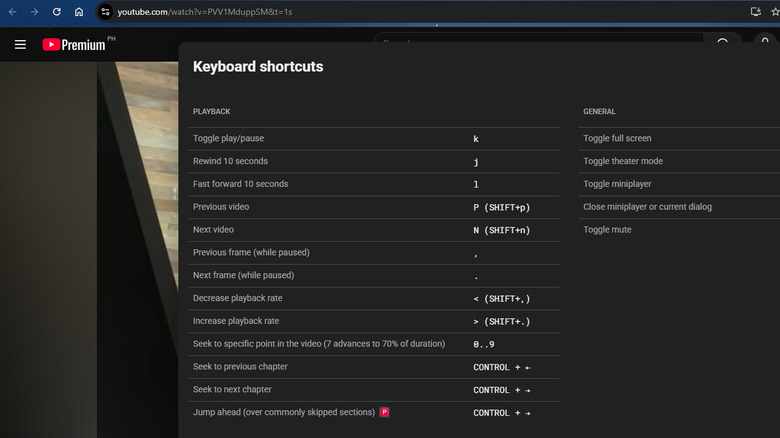
YouTube showing built-in keyboard shortcuts

Marinel Sigue/BGR

Most of YouTube’s keyboard shortcuts are geared towards controlling video playback. Here are some you might find useful:

Seeking:

  • Right/left arrow – Skips forward/backward five seconds.
  • l/j or double press the right/left arrow – Jumps ten seconds forward/backward.
  • 0 (up to 9) – Jumps to certain points of the video (i.e., 0 is beginning, 1 is 10% of the video, 2 is 20%, etc.).
  • Ctrl + right/left arrow – Goes to the next/previous chapter on the video.
  • Ctrl + right arrow – Seeks past the most commonly skipped sections. This is one of YouTube Premium’s hidden features, though, so you can’t perform it on a free account.
  • Home – Restarts the video.
  • End – Jumps to the end of the video.

Playback speed:

  • Shift + comma/period – Slows down/speeds up the playback speed by 0.25x.

Audio:

  • m – Mutes/unmutes the audio.
  • up/down arrow – Turns up/down the volume by 5%.

Viewing modes:

  • f – Displays/exits full screen mode.
  • t – Turns on theater mode.
  • i/ESC – Switches to/exits the miniplayer.

YouTube lets you manipulate captions via keyboard shortcuts too. Press c to enable/disable closed captions and use + or – to increase or decrease the caption’s font size. When watching playlists, Shift + n/p allows you to quickly play the next/previous video. You can also navigate the video frame by frame whenever you need to take a good screenshot. Just pause the video and hit comma or period on the keyboard to move to the previous/next frame. For spherical videos, YouTube offers nifty shortcuts as well — w to pan up, s to pan down, a to pan left, and d to pan right. To zoom in, press ].

Can you customize YouTube’s keyboard shortcuts?
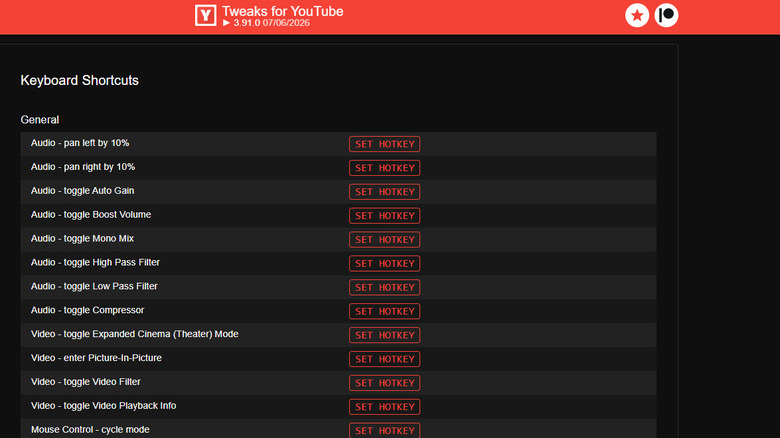
Tweaks for YouTube showing keyboard shortcuts customization

Marinel Sigue/BGR

Unfortunately, you can’t find a built-in setting for customizing YouTube’s shortcuts. But the good news is, there’s an available workaround in the form of browser extensions for YouTube. Some allow keyboard shortcut assignments, giving you the power to control YouTube exactly how you want. One of the popular extensions for this task is ImprovedTube. It offers several YouTube keyboard shortcuts for actions even YouTube doesn’t provide. You can set custom keys to quickly change the video’s quality, play it at a preset speed, and speed past lesser-watched sections. If you need to screenshot a frame, ImprovedTube lets you set a keyboard shortcut for that too. There’s even an option to perform basic YouTube actions, such as like, dislike, and subscribe, with your shortcut of choice.

Enhancer for YouTube comes with the same feature, but for a different set of supported actions. With this browser extension, you can modify how you want to stop the video, increase or decrease the playback speed, and enable cinema mode. Other than these familiar shortcuts, you can also find some interesting ones like flipping the video horizontally and vertically, hiding the comments, and reversing the playlist order.

Finally, you have Tweaks for YouTube. Unlike the other two with limited actions, this browser extension features 60+ YouTube keyboard shortcuts for you to customize. These cover almost every usable menu the platform offers. For instance, you can go to embed mode, turn on video filter, and cycle through subtitle positions. You can also opt to change the existing shortcuts for actions like playing/pausing the video. What makes Tweaks for YouTube stand out is that it even lets you assign some YouTube actions to your mouse.


Share This Article
Email Copy Link Print
Previous Article 4 Graphics Cards More Powerful Than The Steam Machine’s 4 Graphics Cards More Powerful Than The Steam Machine’s
Next Article How To Get The Best Audio Out Of Your Bose Speakers How To Get The Best Audio Out Of Your Bose Speakers
Leave a Comment

Leave a ReplyCancel reply

FacebookLike
XFollow
InstagramFollow
LinkedInFollow
MediumFollow
RSS FeedFollow
Most Read
How coordinating 401(k) contributions with your spouse can unlock thousands in retirement wealth

How coordinating 401(k) contributions with your spouse can unlock thousands in retirement wealth

Health savings accounts can be a great retirement tool – if you’re healthy or wealthy

Health savings accounts can be a great retirement tool – if you’re healthy or wealthy

After 3 reverse stock splits and a $13.5M  loss, this real estate firm bet $8M on crypto it may not be allowed to withdraw

After 3 reverse stock splits and a $13.5M loss, this real estate firm bet $8M on crypto it may not be allowed to withdraw

Disappointed by your skimpy pay raise? Blame your healthcare benefits.

Disappointed by your skimpy pay raise? Blame your healthcare benefits.

Top Commercial Construction Projects Open for Bid: August 2026

Top Commercial Construction Projects Open for Bid: August 2026

World faces fresh food price surge, FAO warns

World faces fresh food price surge, FAO warns

Boeing left engineers, pilots, and regulators in the dark about a late-stage overhaul to 737 Max software responsible for two fatal crashes, says report

Boeing left engineers, pilots, and regulators in the dark about a late-stage overhaul to 737 Max software responsible for two fatal crashes, says report

How Bank Money Learned to Move Like Crypto: Open Banking, Instant Payments and Finland in 2026

How Bank Money Learned to Move Like Crypto: Open Banking, Instant Payments and Finland in 2026

Meet the professional gambler from Illinois who’s shattering ‘Jeopardy!’ records, just tied for the 2nd-longest winning streak, and has taken home $1.6 million in 21 days

Meet the professional gambler from Illinois who’s shattering ‘Jeopardy!’ records, just tied for the 2nd-longest winning streak, and has taken home $1.6 million in 21 days

XRP Price Live Today: Why Is XRP Dropping Below $1.03?

XRP Price Live Today: Why Is XRP Dropping Below $1.03?

Related News
Viagra May Slow the Spread of Cancer
Gadgets

Viagra May Slow the Spread of Cancer

New Troodontid Dinosaur Genus Identified from Fossil Bone Found Decades Ago in New Mexico
Gadgets

New Troodontid Dinosaur Genus Identified from Fossil Bone Found Decades Ago in New Mexico

Bugtraq Is Back: The Original Full Disclosure Mailing List Is Live Again
Gadgets

Bugtraq Is Back: The Original Full Disclosure Mailing List Is Live Again

Elon Said “FEL FTW.” Here’s the Laser That Will Boost Chip Volumes 50X
Gadgets

Elon Said “FEL FTW.” Here’s the Laser That Will Boost Chip Volumes 50X

Apple Just Added These New Android Devices to Its Trade-In List
Gadgets

Apple Just Added These New Android Devices to Its Trade-In List

  • Quick Links:
  • SPORTS
  • Business
  • HEALTH
  • NEWS
  • ENTERTAINMENT
  • Virtual Reality
  • Gadgets
  • WORLD NEWS
  • POLITICS
  • News World
  • Travel
  • Global Affairs
  • Tech
  • Africa News
  • America News
Bioreports
Information You Can Trust: Stay instantly connected with breaking stories and live updates. From politics and technology to entertainment and beyond, we provide real-time coverage you can rely on, making us your dependable source for 24/7 news.
Quick Links
  • Read History
  • Economy
  • Travel
  • Global Security
  • Global Affairs
  • World
  • Technology

© Bioreports News Network. . All Rights Reserved.