At Microsoft today we have almost 25,000 engineers participating in our official
GitHub organizations for open source, a great number of them contributing to open source
communities throughout GitHub. It’s been quite a ride: that’s 10X the engineers
we were working with when I posted in 2015 about our experience
scaling from 20 to 2,000 engineers
in the Azure open source org.
As a member of Microsoft’s Open Source Programs Office (OSPO) team, it’s been exciting to
be a part of this growth, and I wanted to take some time to write down some of the
investments we have made so that others could get a peek inside.
Using data gathered through an open source project I’ll mention in this post, I was able to
query our GitHub entity data to create this chart of Microsoft’s public repos created since 2011:

Some of our employees have always been on GitHub, contributing to projects, sharing
their ideas and insights. Many of our teams are new to social coding and working in the open, and
look to OSPO to help provide documentation and guidance.
We have engineers who are busy contributing to projects all over GitHub, donating their time and code or
entire projects, many I am sure enjoy working with open source in an official capacity, others after
hours, or just hacking away. Looking at the contributors to virtual-kubelet, a project that’s part of the Cloud Native Computing Foundation, I see familiar names of
people I’ve worked with.
The Visual Studio Code team has been on fire, moving
at a fast pace for years. There’s an entire community of awesome people from around the world
on GitHub every day opening issues, performing code reviews, and contributing code to VSCode.
These teams are finding new ways to communicate, to build consensus and governance models, and to
invite maintainers into the fold.
In this post, I will cover:
- Core principles the Open Source Programs Office uses to guide the open source and GitHub experience
- Technical investments we have made to scale GitHub
- Program investments
- Key learnings
- Looking to the future
- Resources including the open source projects mentioned in this post
I’m going to be focusing more on the tactical approach we took to enabling GitHub at scale
and not any specific project’s experience – though I hope to track down and share the experiences
that projects like the Terminal,
TypeScript,
Accessibility Insights, and the
Windows Calculator have had.
We work hard to build the right experiences so that engineers have everything they need,
without the OSPO team getting in their way.
It should be no surprise that open source is a big part of what has helped us to
scale, and we continue to give back and contribute where we can:
- we’ve adopted CLA Assistant, an open source project started by SAP, and now contribute to the project (we threw away our home-built, aging Contributor License Agreement (CLAs) bot!)
- we’re using an open source attribution engine built by Amazon
- our self-service GitHub management tooling is open source
- we’re collaborating on Clearly Defined, an OSI project, to crawl all the open source projects we can find to discover license, copyright, and other data, curating and sharing the resulting data in the open
- our team has invested in moving to more common open services and systems such as containers and Postgres and MongoDB to make it easier to collaborate with other companies and their preferred tech stacks
Looking forward, we have a lot more work to do to focus on developing our
capabilities – evolving our maturity models around what healthy and awesome
projects look like, helping graduate work into the community and to
foundations, and continuing rapid iteration, experiments, and learning from
all of this.
I’m so excited to see where we are at in another few years, and encouraged by
the collaboration happening on open source projects across the industry, the
developing communities around specific Microsoft technologies, and all the
random contributions that Microsoft engineers are making to open source all over
GitHub as their teams take dependencies on and get involved in the associated
communities.
To encourage the right behaviors and teach Microsoft employees how to use
GitHub and participate in communities, we’ve identified a number of tenants or
principles that we try and use in everything that OSPO does specific to our
tooling and approach.
For example, we encourage teams to work in the open on GitHub, getting to learn
the tools and lingo.
Eliminate + Simplify
We’d rather remove a complex process to reduce the work our engineers need to do if
it is not providing the right return or value.
If we need to ask teams questions about the project they want to release as open
source, we focus on what problem we’re trying to solve, and we have been able to
eliminate questions that we used to ask, after thinking through the outcomes with
stakeholders and advisors.
Looking back five years, we used to have a number of manual registration systems
where engineers would let us know what open source they use. These were often free-form
text fields, and many teams would only take a best-faith effort to share that data.
Today we’ve been able to eliminate many of the registration scenarios by detecting
the use of open source in many scenarios across the company, just asking follow-up
questions or going through reviews for certain projects when necessary or needing
more information.
Eliminating process is not always possible, but if we continually ask questions about
the workflows and guidance, and ask the teams using these systems to provide
feedback and suggestions, hopefully we’ll test the edges and eliminate where possible.
Self-service
At scale, we cannot be a roadblock, and we trust and encourage our engineers to learn
through experience. We want to make sure users learn about GitHub teams, and how to
request to join them.
There is no possible way that we would have been able to get 25,000 people
collaborating on GitHub so quickly without building a self-service experience whereby
our engineers could join our GitHub orgs at their pace as they have a need to learn
and participate.
Traditionally, a GitHub invitation needs to be sent by an org owner to a specific
username or e-mail address, and that just would not work well at our scale, without
being in the way of our engineers. Thanks to the GitHub API and our GitHub management
portal, things are smooth.
Whenever possible, we want to provide documents, guidance, and other reusable resources,
instead of having to rely on special knowledge or process that has manual steps.
Delegation
Our office provides guidance and resources to help advise Microsoft businesses
in their approach to contributing to, using, and releasing open source, but we
leave the business decisions with the particular business.
Decisions such as whether to release open source go through a question/answer
experience, and the outcome is either automatic approval, or a business approval
workflow that kicks off, allowing a team’s business and legal
representatives make the final decisions and choices.
We also have begun deputizing “open source champs”: people who can help spread
the good word and provide opinions and advice to their teams about how to think
about open source.
Transparency
Open source centers around collaboration, but one of the challenges today with
GitHub orgs full of many repos is identifying what teams have access to accept
pull requests or administer settings.
While GitHub shows a lot of this data if you start with the Teams view in an org
and drill into a specific team, there’s no view for a given repo’s teams, unless
you’re an admin for that repo.
For all of our repos, releases and reviews,
- Our portal exposes the given teams that control each repo
- All the release requests and data are stored in work items available to any employee
- Our portal for GitHub management shows all GitHub Teams, including ‘secret’ or hidden teams
- We enable cross-org search in our portal, to more easily locate similarly named teams and repos across orgs, reducing confusion and internal support costs
Thanks to this, out of the 1000s of repos, it’s relatively painless to
find the right contacts for a project inside the company.
Authentic GitHub
Engineers should learn how the GitHub interface works, how pull requests and
reviews, issues, forks, organization teams, and collaborators function.
Whenever possible, we hope that our users go directly to GitHub to manage their
teams, configure team maintainers, welcome new community members into their
projects as maintainers or contributors.
While we do have separate internal interfaces and tools, these ideally augment the
native experience. We’ve built a browser extension that our users can install
to help light up GitHub to make it easier to find employees, resources, or internal
tools.
It’s important to us that engineers learn the GitHub fork and pull request model
for contributing, as we strive to use a similar experience for “inner source”
work.
Our engineering team has made many technical investments to help scale
the company to be able to participate in open source better.
Whenever possible we want to use open source to make open source better and
share those learnings and contributions for other companies and individuals to use.
We’ll invest in our own tooling when we must, but look to the marketplace and
work that others are doing on the horizon: we are excited to see GitHub’s
Enterprise Cloud product evolve and drive new features and capabilities into
the product to make enterprise-scale open source easier.
Adopting CLA Assistant
Today we host an instance of an open source project for Contributor License Agreement (CLA)
management, integrated with GitHub, called
CLA Assistant. This allows us to make sure that
people contributing to our projects have signed the appropriate CLA before we
accept a contribution.
Once the CLA for an entity is signed once by a community member, they can then
contribute to all other repos, so it’s really a relatively low burden that helps
keep our lawyer friends happy.

CLA Assistant is an open source project that was started by SAP and is licensed as Apache 2.0.
We’ve contributed to the project functionality to help with scale issues and rate limiting,
automatic signing to handle when employees join and leave the company, and are
excited to be able to support a new class of corporate CLAs thanks to contributions made
by others to that project.
In 2017 we migrated to this new open solution from the in-house CLA bot that we abandoned.
I really like how the
VSCode team messaged this to their community with a GitHub issue (#34239).
The system is powered by GitHub org-level webhooks, so it is “always on” and teams do not
need to worry about whether their repos are protected with the CLA and ready for contribution.
Data and Insights
GitHub provides useful information including traffic stats, contributor info and
other breakdowns at the repository level.
Across Microsoft’s open source projects, however, we have a need to be able to slice
and dice data looking for trends over time, analyzing investments at scale, and so realized
early on that we needed to import all of the available data we can from our GitHub
open source releases into our own big data systems such as Azure Data Lake and Azure Data Explorer.
Newer GitHub Enterprise Cloud features look
to help provide organization insights, and we’re super excited to give those a
try to augment the other data and insight methods we are using today.
Here are some of the projects we’ve used, created, or collaborated on.
GHTorrent
Our team is one of the sponsors of the GHTorrent Project,
an effort to create a scalable, queryable, offline mirror of data offered through
the GitHub REST API. The repo is at github.com/gousiosg/github-mirror.
This data, similar to GHArchive, helps learn about the broad collaboration
happening on GitHub.
We donate cloud compute resources to the project run by Georgios Gousios
who kicked off the project with ideas and collaboration with Diomidis Spinellis.
At Microsoft, we ingest the data into Azure Data Lake to be able to run
interesting queries and learn more about trends and happenings beyond our
campus.
GHCrawler
GHCrawler is a robust GitHub API
crawler that walks a queue of GitHub entities transitively, retrieving and storing
their contents. The initial project launched in 2016 and evolved significantly
at the TODO Group tools hackathon in June 2017
while working with other companies to abstract the data stores to support
other technologies and stacks.
The crawler taught us a lot about the GitHub API and how to be friendly
citizens by focusing on the caching of entities, the use of e-tags, and being
careful to not repeatedly fetch the same resource.
Different from GHTorrent, the crawler is able to traverse Microsoft’s own open
source organizations using tokens that can peer into our current GitHub team
memberships, retrieve info about maintainers, configuration, and private repos,
and so is very useful in answering operational questions about the growth of
GitHub at Microsoft.
We ingest the data from GHCrawler into both Azure Data Lake
Azure Data Explorer
and use that data in Power BI dashboards and reports, live data display on
internal sites, and other resources.
The chart of new repos at the top of this post was created by querying this crawler
data as stored in Azure Data Explorer. Here’s a query that returns repos created
in the official Microsoft organization in the last 30 days (that are public):

Since the data comes from GitHub but is stored internally, teams can make use
of the data for their own business needs and interests, without having to worry
about GitHub API rate limiting, the specifics around collecting that data, and
just being able to focus on using the data effectively to solve business
problems.
A favorite resource for many teams looking to build new communities is the
data around pull requests and issues, and also collected traffic API data. Since
GitHub only provides a 2-week window of consolidated traffic info, storing the
data in our big data tools helps us look at trends more easily.
ClearlyDefined
ClearlyDefined is an
Open Source Initiative (OSI) project
that has a mission to help FOSS projects thrive by being “clearly defined”. The
lack of clarity around licenses reduces engagement that ends up meaning fewer
users, fewer contributors, and a smaller community.
Communities choose a license for their project with the terms that they like.
Defining and knowing the license for an open source project is essential to
a successful community partnership, and so ClearlyDefined helps clarify that
by identifying key data such as license set, attribution parties, code
location, and when the data is missing, curation can help.
Microsoft contributes to the effort and is making use of the data to help provide license
clarity in the tooling used to help teams understand their use of open source.
As of June 2019, ClearlyDefined has over 6.3 million definitions. These
definitions are created by running tools such as licensee,
scancode-toolkit, and
fossology tools across oodles of open source.
repolinter
Another TODO Group project OSPO collaborates on is repolinter.
Given a source repository, you can run repolinter to learn basic information
that can help inform whether a project has all that is necessary to incubate
and build a healthy community, such as
- license files
- README files
- Code of Conduct, governance or contribution information
- No binaries
- Licenses detectable by licensee
- Source headers have license information
We hope to be able to share this data in a more visible way to help teams see
where they can make simple improvements, or even by automatically opening pull
requests if they are missing the essentials such as a mention of the Code of Conduct.
oss-attribution-builder
We’ve collaborated with Amazon and use their
amzn/oss-attribution-builder project to
help build open source license notice files to help teams meet their legal
obligations.
GitHub management portal
Microsoft’s GitHub management portal that employees to use,
detailed in my 2015 post on the portal,
handles:
- self-service org joining for employees
- cross-organization search of people, repos, and teams
- support jobs to maintain data
- generating digests and reports
- caching GitHub REST API responses
- processing web hook events
Here you can see an experience where you can search, sort and filter repos across
all of the many GitHub orgs in one place, improving discoverability.

The portal itself is open source and has been rebuilt and refactored over the
past few years to try and be more useful and to allow other companies to use it:
- Node service and site, now implemented in TypeScript
- Backing stores supported include Postgres and others backed by interfaces
- An out-of-the-box “run local in memory” experience is now available
The repo is on GitHub at microsoft/opensource-portal.
New repo wizard
While we have a very liberal and friendly policy to make it easy for an
engineering team to decide to share some code such as a sample, we do want to
make sure that there’s a process in place that includes a business decision and
legal team approval if there’s a major release being considered.
Microsoft has chosen to turn off the “Allow Members to Create Repositories” option
on our open source GitHub organizations.
Instead, we have our own “new repository wizard” within our GitHub management
tooling. This site collects information about the purpose of the repo, the
common GitHub Team permissions that will help a group of engineers get off and
running, and then populates the repo with the standard Microsoft open source
content such as Code of Conduct info in the README, an appropriate LICENSE file
for the project, and the original purpose and use of the repo, for data reporting
purposes internally.

To make this experience easier to find, we work to educate people through
documentation and tools such as the previously mentioned Open Source Assistant
web browser extension. The extension is able to light up the green “new repo” button
on our orgs and link directly to the wizard, providing a better user experience
than the “you have insufficient permission to create a new repository” message
that our users would receive on GitHub otherwise.
The outcome of the repo wizard will be the creation of a public or private
repo on GitHub.
We ask, by policy, that teams only use our open source GitHub orgs for work
they are going to ship within the next 30 days.
Release reviews
The outcome of the new repo wizard is either auto-approval to make a project
public, or the kick-off of a business and legal review process, to help comply
with policy, and inform leaders about important open source decisions that are
being made.
We have an internal service called the Usage Service that creates a work item
in our work item tracking system (Azure Boards), and assigns that work
item to the appropriate legal and business reviewer. The work item is then
passed along, with fields or more info being filled out, discussions are had, and
eventually the review will be “final approved” and ready for teams to ship their
project to the world and go build that open community.
Here is a screenshot, redacted of the details and names, showing the work
item for the release approval of the Windows Calculator:

After the final approval, an automated e-mail is sent to the original requester
with any guidance from the various reviewers involved in the process, to help
them understand any notifications, legal obligations, or other work that needs
to be done to support their release.
Open Source Assistant Browser Extension
Internally we ship a browser extension that lights up GitHub with Microsoft-specific
information and guidance.
Since a GitHub username may not be related to a person’s recognized corporate
identity, the extension lights up the more common corporate alias inline throughout
GitHub – pull requests, issues, people profiles.

By highlighting other Microsoft employees on GitHub, people who use the extension
are able to dedicate additional focus on a good collaboration experience with
the community, while easily being able to better identify their coworkers on
the site.
The extension helps people to continue to use the native GitHub experience,
while augmenting bits and pieces where we’ve made decisions around our GitHub
org settings, such as disabling New Repo creation direct on GitHub.
The extension also is also to provide links to policy around open source,
link to the ‘new repository’ wizard.
Since we disable native repo creation on GitHub
in order to ask engineers to complete our wizard to learn more about their intent
with their open source release, we often would get support questions about how
to create repos, since GitHub would display the message that the user could not
create repos.
Now, this is what they see:

In another sceenshot, you can see a “Join” button that lets an employee self-service join
the GitHub organization through our GitHub management portal:

Finally, since we want teams to use our official GitHub org that is configured automatically
with the CLA system, with compliance tools, audit logs, and the ability to manage the lifecycle of when
users join and leave, we do not allow teams to create new GitHub orgs for open source.
By updating GitHub’s “new organization” page, we have a chance to let people know about the policy and other resources before they get too far down the road of trying to setup yet-another-org.

The extension works Firefox, Chrome, and the new Edge based on Chromium.
Microsoft employees can learn more and install the extension at aka.ms/1esassistant.
While this extenson is not open source today, if others think it could help
their organization, I can see what we can do.
Regular automation jobs
We’ve implemented jobs that do everything from keeping data and caches up-to-date to
helping make sure that we have confidence in the membership of our GitHub organizations.
These jobs are all open source, implemented in TypeScript, as a part of the
opensource-portal repo.
Removing former employees
Connected to HR data sources, we can react when an employee leaves the company. In a
big company, people are always changing roles, trying new things, and sometimes they
leave for other opportunities.
We unlink people when they leave: removing the association between their GitHub
account and their corporate identity, and removing their GitHub organization
membership(s).
We welcome former employees to continue to contribute and participate to projects
where they should continue to be maintainers, but for clarity, do not allow them
to remain as org members.
We also send an e-mail to their former manager, so they have confidence that the
right things have happened with permissions and system access.
Enforced “system teams”
To help enable operations, support, meet security obligations, and light up bots
such as our CLA system, we have a set of GitHub teams that are automatically
and permanently added to every repository in our GitHub orgs, when the job is
configured.
By monitoring the GitHub event bus, the job adds what we call system teams to
a repo the instant a new repo is created. And, if a repo admin tries to remove
or change the permissions that such a system team has, the job automatically
restores its permission.
An occassional cronjob also runs to validate and reenforce these teams as needed.
Preventing big permission grants
As the number of members in a GitHub organization grows high, you’ll also start
to see very large teams.
We have teams such as “All Employee Members” that are designed to give easy read
access to private repos that are being finished up and polished before going open
source.
An unintended side effect we found: some people wanted to just give “all members”
administrative access over their repo, to make the act of onboarding get much
easier.
Trouble is, with admin comes great power, and any of the thousands of members of
the org could then delete the repo, change whatever they want, override branch
protections, etc.
This also would automatically subscribe thousands of people
to spammy notification messages, depending on their GitHub notification
preferences.
As a result, we have a “large permissions” job that monitors for grants of write or
admin access to an org-defined “large” number of people. Once such a grant is made,
and the team is too large, the job will automatically downgrade the permissions to
try and prevent mistakes, and then send an e-mail address to the person who
made the permission choice, hoping to educate them about the risks and help them
understand what changes were made.
GitHub username changes
GitHub allows users to change their username. This is excellent: many people start
with a cute screen name or other indicator, then realize they’re professionally
developing software with their peers in the industry, and often want to change that
username.
Not all users know that they can rename their account, so we do get people who delete
an account, just to create a new one.
However, the majority of GitHub apps and APIs work off of GitHub usernames instead of
the integer-based user ID.
To help stay ahead of this, we have a cronjob that looks up GitHub users by ID and then
refreshes our internal data store of those usernames, in the hope that we can improve
the API success rate and reduce support costs when renames happen.
For critical operations, additional logic has been added to GitHub apps to anticipate
the potential of a user rename happening, and being able to smartly attempt to fallback to
looking up the user first by ID, or alerting and sending the issue to operational support.
Weekly and daily digests
We have a cronjob that sends updates about new changes and interesting happenings on
GitHub repos. These are typically only send to repo admins, to not spam too many
people.

The digests are personalized to the receipient, and cover scenarios such as:
- notifying the creator of a repo, and their manager, of the new repo
- notifying when the # of admins becomes rather high, so that team maintainers can cleanup permissions
- abandoned repos that haven’t been touched in years
- when a team is down to a single maintainer, suggesting they appoint another maintainer or two
- when a repository has been flipped from private to public
More important than the technical tools and hacks we put in place, the programs
that we run in the Open Source Programs Office help drive process improvements,
awareness of features and capabilities, roll out new functionality, and to
emphasis the work that is happening in the open in new ways.
Here’s a set of the OSPO investments we have been making or put in place to help
drive improvement in the open source maturity level of the company.
Docs
We have a central documentation repository that is easily accessible to employees
where they can read through guides on how to go about releasing open source, or
contributing to it. The hope is that teams new to many of the tools and approaches
in open source can refer to the material, share it with others, and help us to
scale this to others.
Here’s a rough look at the outline of some of that material. In time I hope we
can prepare a version of these docs to share with the world…
- General Information
  - What exactly is Open Source?
  - When and why Open Source
  - Can I use it?
  - Misconceptions
  - Bad Practices
  - Benefits
- Use
  - Overview
  - Security and vulnerability management
  - Copyleft obligations
  - Code signing
  - Attribution guidelines
  - Business review process
  - Required notice generation
  - Automated registration of use
- Contribute
  - Contribution overview
  - Forking repositories
  - Business review, if required
- Release
  - Release overview
  - Checklist
  - Copyright headers
  - Foster your community
  - Build and publish your project
  - Code signing
  - Business review, if required
- Data and Insights
  - GitHub insights
  - Registrations and request insights
- GitHub information
  - GitHub overview
  - Accounts and linking
  - Repositories
  - Teams
  - Organizations
  - Transferring and migrating repos
  - Service accounts
  - Two-factor authentication
  - Apps, services and integrations
  - Large files, LFS
Monthly newsletter
The team prepares a monthly newsletter to all interested parties in the company,
including all linked GitHub users, with a distribution north of 25,000
members. As a low-frequency resource, the hope is that the newsletter helps
provide useful information without inundating teams.

Typical newsletters will include 3-5 topics and updates of note, some data or
graphs and charts of adoption and community health, and the date for the next
open source meetup.
Open Source Meetup

A monthly gathering on the Microsoft campus (or online), the meetup is a quick
event that starts off with networking, a quick lunch, and then 3-4 speakers
who share their recent open source experiences.
This helps connect people, have interesting conversations, and build community.
Open Source Champs
A cross-company group of people who “get it”, these are some of the best open
source minds at Microsoft, who have connections, experience, data, and can help
drive best practices and advise on situations.
The champs primarily get involved in a specific discussion list in the company
today, but hopefully in time they will also be able to help share information
with their organizations, and build a two-way conversation channel with more
stakeholders and businesses across the company.
The champs will be a key part of helping us continue to scale and share and
get subject matter experts connected with the right teams as they open up.
Internal support
OSPO offers an internal support experience, with internal mail, a Teams channel,
and other places, to help support people as needed.
The most common issues tend to be helping people find the documentation for what
they are looking to do, pointing them at the GitHub account linking experience or
new repo wizard, or helping answer policy clarifications and questions.
Not all questions can be answered by OSPO – we do at times need people to reach
out to their legal contact for their organization to support their request.
It is also super important to us that we update internal docs and tools when
we learn of gaps or improvements that can be made, so that the next group of
people with the same need will not need an escalation or support incident to
help answer their question.
We look to our principles around delegation, self-service, and elimination to
help reduce support cost, solving problems before they grow too large. A
clever hack or targeted fix often helps a lot.
Executive council and briefings
Appointed executives from across Microsoft’s businesses make up the majority
of the “OSS Exec Council” that meets at least quarterly to discuss progress on
evolving the culture, being available to advise how their groups are contributing
to open source, and otherwise helping provide a conduit with leadership, the
open source champs, and our open source office. In many ways, this group is the
“board of directors” of our OSPO team and we look forward to helping to tackle
whatever is next as a company in this space.
Having this in place helps us take the temperature of leadership of where to spend
our effort and how to think about complicated issues and how to make things
friction-free for our engineering teams who want to contribute to and use
open source everywhere.
We’re also available to brief business leaders and others on their approach, share
the learnings others have had, and strive to remove roadblocks with all teams.
We’ve learned a lot, and continue to learn as we
scale the open source adoption across the company. Many of the specifics learnings
I’ve had relate to how we operate at scale, how much we can set teams free with
tools and access, and how to help others learn from the experiences.
Just a few short stories…
Our GitHub Bedlam moment
GitHub is super real: we finally had our own “Bedlam” incident earlier this year… we had a
GitHub team inside one of our largest GitHub orgs called “All Members”, to make it easy to quickly
give access to private repos ahead of the launch of new work at events.
The idea is that as long as you give ‘all members’ read access to the repo, they
can then fork and submit pull requests, making it easier than trying to figure out
what teams may grant them the rights they need. It also encourages the more open
contribution model we love.
GitHub Team Discussions shipped in late
2017 and essentially were not very frequently used by our open source teams for
quite a while.
Finally, one quiet day in January, it finally happened…
… someone posted a message to the “all employees in this org” team discussion,
immediately going out to a lot of people … and then someone posted about how
to update your notification settings … and then it spiraled out from there.
Along the way we learned a few things:
- People learned about GitHub discussions
- We may have found a few minor bugs in the notification settings on GitHub that were corrected
- We realized there are downsides to massive teams
- We had some fun, too
Old time Microsoft people smiled a lot. Bedlam was a classic Microsoft learning
lesson. It’s fun that we can still have similar experiences with the modern
developer toolkit, too…
Two-factor authentication
A surprising amount of our internal support traffic comes from employees who
unfortunately lose access to their GitHub accounts.
Since we require our users to use GitHub’s two-factor authentication, and this
is a separate two-factor system than the Azure Active Directory multi-factor
auth that our employees also use, it’s easy for people to get confused, or to
lose access to the GitHub side of things.
Thankfully, GitHub does a great job of helping remind people to save their
two-factor authentication codes and to encourage other technology such as the use
of U2F devices.
Everytime a new iPhone model comes out, our support volume spikes… a lot of
people use two-factor authentication apps on their phone, but then forget to
store their backup codes or anticipate that wiping their phone and upgrading to a new
one may not always restore what they think it may.
I strongly recommend that everyone have a YubiKey to help make things easier when
using GitHub on a daily basis.
GitHub API: user renames
Most GitHub REST v3 API calls operate
on GitHub username as opposed to user IDs.
GitHub allows users to change their username, which means that if you are not
also validating what their current username is, you could find that a few API
calls are not working for a particular set of users who have changed their
usernames.
There is a GitHub API that can take a GitHub user ID and provide you the current
user information response, so you can hit that occassionally, such as in a daily
job which also respects e-tags and caches responses, to make sure you have the
accurate username before calling operational APIs.
At scale, we tend to see about 25 user renames per week at Microsoft right now.
GitHub API: conditional requests
The GitHub API’s conditional request guidance
is good, but many libraries or users of their APIs do not seem to use them by
default.
As long as you keep a cached version of the entities you request, you can use
the e-tag and an If-None-Match header to help reduce your load on the rate
limits for GitHub. A request with the existing e-tag, to check if the entity
has changed, will not count against your rolling API limit if it has not changed.
It’s great seeing more and more libraries such as octokit/rest.js
supporting this concept in various ways, or having extensibility for it.
Be nice to GitHub’s API.
Team vs Individual repo permissions
Whenever possible we strongly encourage that the repositories that Microsoft
governs use team permissions instead of granting individual permissions.
GitHub Teams support multiple team maintainers, helping projects evolve over
time, and making it easier to keep access and admin permission assigned as
needed.
We’ve had to do a lot of user education on this topic: if someone opens a support
ticket needing access permissions, we will never grant them individual permissions
(“Collaborator” on GitHub) to a repo, but instead will ask them to help us find
or create a new Team on GitHub for that permission assignment to go to.
Team permissions. Teams with maintainers. Avoid individual permissions. This helps keep things sane. Very sane.
Transparency around permissions
As previously mentioned, our GitHub management portal shows all employees all the permissions for teams,
including secret teams. Since we are focused on enabling open source on GitHub,
this helps answer questions people have about who has access to administer or
change settings on a repo and reduces support volume.
On GitHub you can natively see, given a team, which repos and permissions it
has, if you are a member of the org. However, you cannot see easily from a given
repo who the teams are.
Transparent data in the portal reduces support costs around the “404 these aren’t the droids you are looking for” experience on GitHub:
since GitHub will return a 404 for a repo that an org member does not have
access to, we used to get a decent amount of support traffic from people asking
if the URL they were sent by a team member was real or not.
Paying GitHub
Before we spent a few billion dollars on GitHub, we had paid GitHub organization accounts
at various pricing tiers for our open source GitHub orgs: we needed private repo access for people getting
ready to release their open source.
Early on we would have a bunch of people running around with corporate cards and expensing
GitHub. Over the years we were able to consolidate this spend and bring sanity as the
GitHub use scaled, and also to help use that as a forcing function: by centrally funding
the official GitHub organizations for open source in the OSPO team, we were able to
make it easy for teams to get going without having to worry about billing or setting up
new organizations and systems.
GitHub offered a really useful annual invoice payment method, so instead of having
to worry about using a corporate card or other payment method each month, we would
just submit a single payment for a set of GitHub orgs, then process that for
payment. GitHub sales was super helpful and friendly.
The only minor issue we’ve had with this is the few times that we had to make
changes to the LFS data packs for an org during the year… we would solve this
by approving the purchase order for GitHub to include some additional buffer, so
that GitHub sales could just invoice us for the additional data packs as needed.
Before we used the invoice payment method, we did use corporate credit cards as
needed and approved by our finance team; it was nice that we could associate a
Billing Manager or managers to the orgs to help manage that without having to
worry about permission to be org owners or control the resource itself.
Kudos to the friendly GitHub sales and their supporting staff – they were always
willing to jump on a Zoom video conference call and work through the details, such as
when we were signing the Corporate Terms of Service agreement for some of our orgs.
GitHub’s annual invoice payment option is really straightforward and can help you reduce random one-off corporate card expenses.
Org proliferation
Many Microsoft teams love to ship the org chart, but when it comes to reinforcing
Microsoft’s open source releases, we prefer all repos to go in our few main
organizations.
This also helps make it easier for engineers to get going: they do not need to
identify both an org and a team to work on a repo, they just need to know the
repo name or team details.
By policy and reinforced in our tooling and other systems, we have asked people
to just use the official Microsoft GitHub org since early 2017.
This has been super important by providing a really straightforward way for people
to get access and not worry about cross-org permissions or finding things. We
also know that product names and teams change so often that these things just
would not scale. While the GitHub rename features provide some flexibility to
orgs and repos, we would prefer not to change too many things at once.
Newer GitHub features such as an enterprise account
announced in May sound really useful to help address this in the future: if you
can combine compliance and billing together, perhaps it will be easier to have
additional organizations where it makes sense.
Build a strategy around how many GitHub organizations your organization will have for open source. The answer might be 1.
We’re continually learning from people! People are great.
Products vs Projects
Microsoft is super crisp on the requirements to ship products and services: the
Microsoft Security Development Lifecycle (SDL)
helps team to be mindful of security and how to build and ship software.
As a company, our products also have requirements around code signing, packaging,
localization, globalization, servicing, accessibility, etc.
Shipping an open source code project (a repo) is a little less involved, but teams
still need to do the right thing.
Our policies around releasing source code are more about business purpose and approval,
making sure governance information and LICENSE files and READMEs are in place, and that
teams are ready to support, build and evolve a friendly open community.
We’ve had a few learning situations where teams thought that the full set of requirements
to release a product – such as localizing in many languages – were required to release
an open source repo.
For now, we emphasize to teams that projects are not products, but often, they compliment
one another, and sometimes, they literally are the same thing.
Products and services are very different from open source code. That’s OK. Tell your friends.
Forking guidance
Forking is a big deal in the open source world. There are times where a fork is the
right evolution or move for a community to evolve, but we’ve found that some teams view
forks as the way to contribute upstream.
For example: if someone wants to contribute to CLA Assistant, one approach would be to
fork the repo to their individual GitHub account, and then to submit a pull request to
that upstream project. Another approach would be to fork the project to the official Microsoft
organization, prepare changes, and then submit it as a pull request.
While the second example
makes it clear that this is very much a Microsoft contribution, it creates confusion, because
Microsoft just wants to participate in the upstream project, and not fork it in any hard way.
We strongly encourage teams to simply fork and submit pull requests, the GitHub way, from
their individual accounts, not from the official organization account.
We want teams to always contribute to the upstream when possible and only fork as a last resort.
Forking can be a big deal. Upstream is the right place to contribute.
Support volume (e-mail)
Since we set the e-mail address opensource at microsoft as the e-mail address associated
with the official Microsoft organization on GitHub, we get a lot of e-mail traffic from
people looking for help with issues and products.
Within GitHub, if you’re browsing a repo and click “Contact GitHub” in the footer of the web
page, it essentially asks whether you are looking to report a GitHub issue or an issue with
the repo. This helps reduce issue/support traffic to GitHub for open source repos.
GitHub then offers the e-mail address associated with the SUPPORT files for the repo, or falls
back to the org-wide e-mail address. So… we get a lot of e-mail.
We’ve learned to improve spam filters and use templates and work to address issues, but
we do get a lot of mail.
Expect that support will need to happen.
People want more open source from us!
On the entertaining side, many passionate users of long-time Microsoft software regularly
write in to ask us to open source their favorite projects…
- Flight Simulator
- Microsoft Money
- Age of Empires
- our operating system
It’s great that people really want to see this, but I think a lot of folks do not always
understand that commercial software often has many dependencies or licensed components
that may not be open source, or the code requires a very specialized build environment,
etc.
I do love seeing the historical releases to share code, such as the
original winfile.exe or
old-school MS-DOS 1.25 and 2.0! Hopefully
teams will find the time to share when it makes sense. It’s also a reality that historical
software releases are not a place that will be easy to build an active collaborative
community around unless a clean mechanism exists to release and build modern bits.
Open source all the things
As outlined in Build like an open source community with GitHub Enterprise, Mario Rodriguez from
GitHub highlights how the features that help make GitHub great for open source can
also be super useful for any organization.
We’ve started moving to GitHub Enterprise Cloud for more of our open source
organizations and I’m excited to see what our engineering teams will do with
these new capabilities.
A few capabilities in particular that we’re starting to use include:
Org insights
Available in beta now for Enterprise Cloud accounts, you can take a look at the high-level
trends around new issues, closed issues, and other key specs and data points for all of your
repositories across the org.
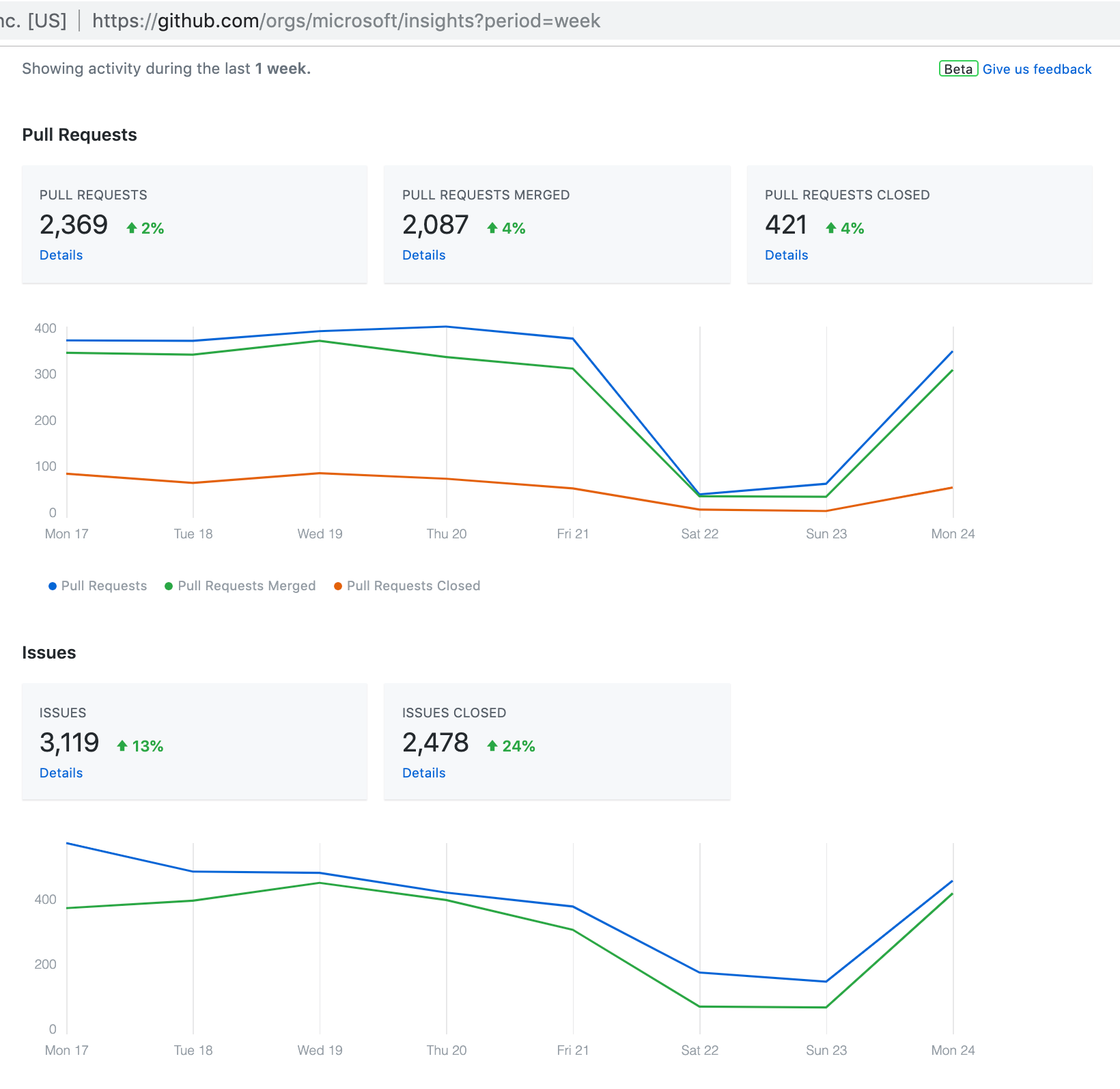
Another nice view is the “where members are getting work done” look at where time is being spent on GitHub by everyone contributing to the org.

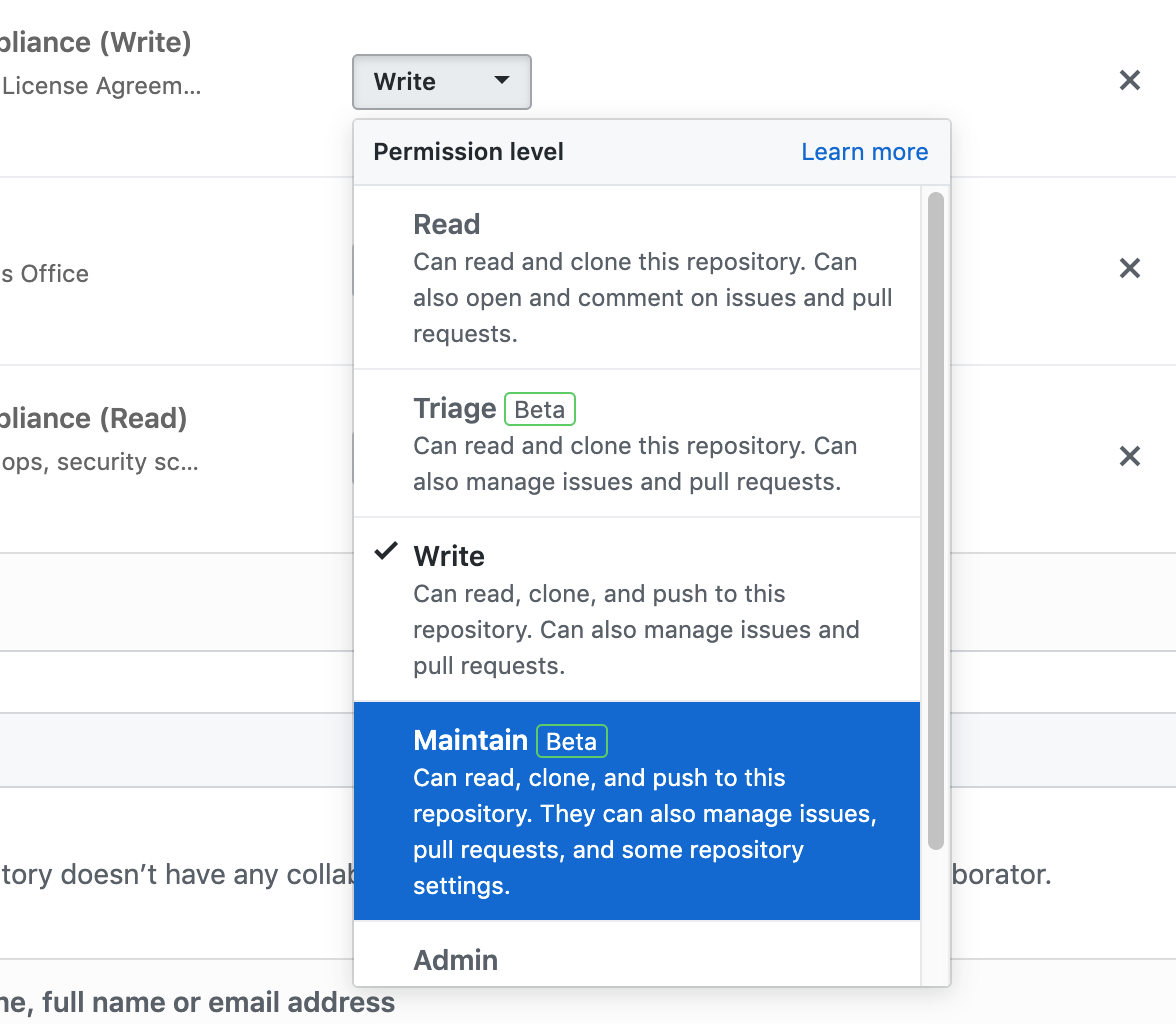
Maintainer roles
Especially interesting to teams like .NET which have a large amount of activity and
maintainers, new roles beyond the classic “read/write/admin” on GitHub means that
they can appoint Triage users (can manage issues and PRs, but not push code directly to the repo) or Maintain users (additional settings on top of issues and PR management).
Transferring issues
Moving issues between repos used to be done by third-party, unofficial, or random tooling, and
now that GitHub directly supports issue movement, we’re pretty happy to see this additional option
open for communities who have issues spanning multiple repos.
Audit logs
GitHub has an audit log API beta for Enterprise Cloud customers now. Using GraphQL,
this means that we will be able to keep an audit log copy in our systems for review,
analysis, and without the manual or cumbersome approach required today to either
ingest and store webhook information in an append-only data store, and/or parse the
JSON and CSV versions of the audit log for a GitHub organization.
We have a lot left to do and our journey will continue to get more interesting as
Microsoft continues its open source adventure. Some of the things the Open Source
Programs Office will be thinking through will include…
As a company we will continue to work to evolve our take on a “maturity model” for
open source organizations, and I can’t wait to see what is next.
Sharing guidance and guides
Similar to the Open Source Guides at //opensource.guide created
by GitHub, we’d love to share, to help others in the industry learn from our
progress.
Playbooks around how to think about open source, making business decisions related to
open source, all are fun topics we would love to share our learnings and take on.
We may also be able to share our docs, or a version of them, with the world. Major kudos to Google who already shares their open source guidance and policies
on their site.
Identifying contribution opportunities
We are starting to look at ways to draw attention to contribution opportunities, such
as highlighting up-for-grabs issues across our releases,
and also recognizing when our employees contribute to open projects outside control of the
company, too.
By updating the opensource.microsoft.com site, we hope to be able to tell good
stories and share useful information about what our teams are up to.
As a short-term experiment, we are listing “up for grabs” issues right on the homepage of
our open source site, to learn about whether people find that interesting.

Here are open source GitHub repos mentioned in this post. Check them out!
- cla-assistant/cla-assistant
- amzn/oss-attribution-builder
- clearlydefined/crawler
- todogroup/repolinter
- clearlydefined/curated-data
- microsoft/opensource-portal
- microsoft/ghcrawler
- fossology/fossology
- nexB/scancode-toolkit
- licensee/licensee
- octokit/rest.js
Hope you found this interesting, let me know what you think on Twitter. If you were expecting a
short or concise post, you may have clicked on the wrong thing…
Jeff Wilcox
Principal Software Engineer
Microsoft Open Source Programs Office