As you already know, everyday there are hundreds of new additions to the GitHub repository. But, many good projects go unnoticed, and never receive the attention they deserve. Our primary purpose is to find and promote the useful open source projects via OSTechNix. Today, I have stumbled upon a cool project called Ramroot. Using Ramroot, we can run Arch Linux entirely from RAM! Yes, you read right. It loads the entire root filesystem into RAM at system boot. It is specially designed for Arch Linux. I tried it in Ubuntu, but It didn’t work. I hope the developer will make it to work on other Linux distributions as well.
Ramroot – Run Arch Linux Entirely From RAM!
Installing Ramroot
Ramroot is available in AUR, so you can install it using any AUR helper programs, for example Yay.
$ yay -S ramroot
Then, enable Ramroot using command:
$ ramroot enable
Sample output:
:: Detected root UUID: 6517af02-68e9-484e-9dae-f0ed61822ad3
:: No /boot UUID detected.
:: zram added to mkinitcpio.conf MODULES
:: ext4 added to mkinitcpio.conf MODULES
:: vfat added to mkinitcpio.conf MODULES
:: ramroot added to mkinitcpio.conf HOOKS
:: Enabling ramroot...
[sudo] password for sk:
==> Building image from preset: /etc/mkinitcpio.d/linux.preset: 'default'
-> -k /boot/vmlinuz-linux -c /etc/mkinitcpio.conf -g /boot/initramfs-linux.img
==> Starting build: 4.17.6-1-ARCH
-> Running build hook: [base]
-> Running build hook: [udev]
-> Running build hook: [ramroot]
-> Running build hook: [autodetect]
-> Running build hook: [modconf]
-> Running build hook: [block]
-> Running build hook: [filesystems]
-> Running build hook: [keyboard]
-> Running build hook: [fsck]
==> Generating module dependencies
==> Creating gzip-compressed initcpio image: /boot/initramfs-linux.img
==> Image generation successful
==> Building image from preset: /etc/mkinitcpio.d/linux.preset: 'fallback'
-> -k /boot/vmlinuz-linux -c /etc/mkinitcpio.conf -g /boot/initramfs-linux-fallback.img -S autodetect
==> Starting build: 4.17.6-1-ARCH
-> Running build hook: [base]
-> Running build hook: [udev]
-> Running build hook: [ramroot]
-> Running build hook: [modconf]
-> Running build hook: [block]
==> WARNING: Possibly missing firmware for module: wd719x
==> WARNING: Possibly missing firmware for module: aic94xx
-> Running build hook: [filesystems]
-> Running build hook: [keyboard]
-> Running build hook: [fsck]
==> Generating module dependencies
==> Creating gzip-compressed initcpio image: /boot/initramfs-linux-fallback.img
==> Image generation successful
:: ramroot enabled.
If it doesn’t work for any reason, grab the Ramroot binary from GitHub repository and run it as described below.
Git clone the Ramroot repository using command:
$ git clone https://github.com/arcmags/ramroot.git
Cloning into 'ramroot'...
remote: Counting objects: 94, done.
remote: Compressing objects: 100% (52/52), done.
remote: Total 94 (delta 41), reused 82 (delta 32), pack-reused 0
Unpacking objects: 100% (94/94), done.
The above command will create a folder named “ramroot” in the current working directory and save all contents of Ramroot project in it.
Then, go to the Ramroot bin directory:
$ cd ramroot/bin/
Make the following files a executable:
$ chmod +x ramroot-build
$ chmod +x ramroot-enable
Finally, run the following command to enable the Ramroot.
$ ./ramroot-enable
Enter your sudo or root password when prompted.
Now, reboot the system. At boot process, you will be prompted to load the filesystem into RAM. Type “Yes” to proceed.
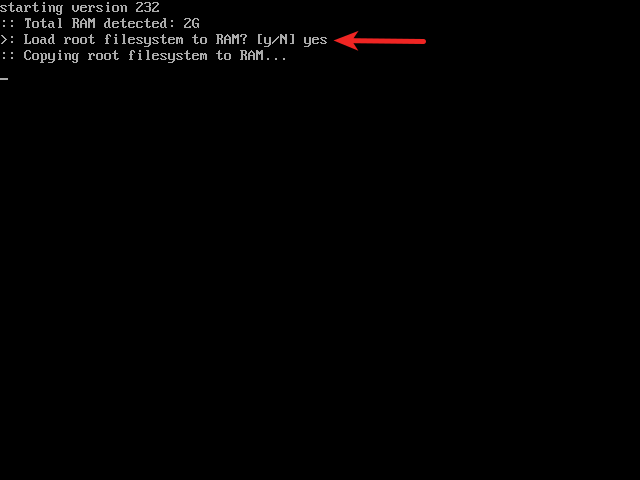
Load root filesystem to RAM
Please note that this prompt (y/N) defaults to yes with a 15 second timeout if 4G or more of RAM is detected. Since, I have 2GiB RAM, I had to type “Y” to continue. Wait for a while to finish the loading process. It will take several minutes to load the entire root filesystem into RAM. Make sure you have sufficient RAM installed on your system. If you want to maintain faster RAM sync times, try to keep a clean and trimmed down system. Remove old and unnecessary packages, and keep your package cache folder clean.
Update:
If you use the most recent Ramroot version, the installed RAM size should be at least 500MB more than the size of root filesystem. If there is at least 500MB more RAM than the size of the filesystem, the user will be prompted to load the root filesystem to RAM. If the size of the root filesystem is less than the installed memory, the latest Ramroot version won’t load the Root filesystem in your RAM. It won’t even prompt you whether it should load filesystem into RAM or not. The filesystem will be mounted in your local disk automatically and the Arch Linux will boot normally.
Once root filesystem is loaded into the RAM, you will be landed into rootfs prompt. Please note that nothing will be saved after reboot. Because our Arch Linux is entirely loading from RAM, not from the local disk.
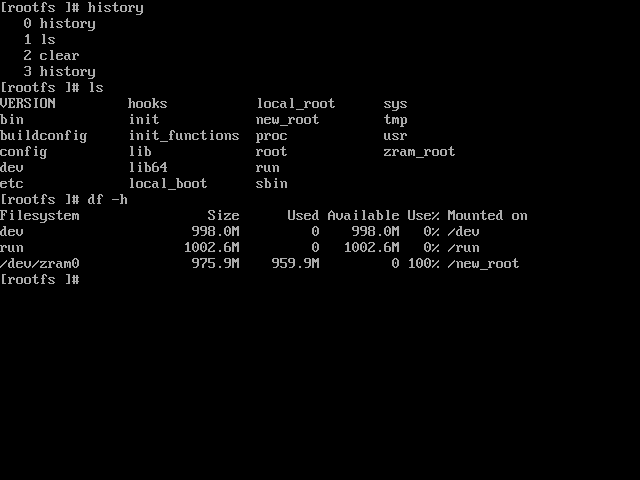
Root filesystem loaded into RAM
Remove Ramroot
Reboot your system, and type “n” when it asks to load the filesystem to RAM to login normally to your Arch Linux system. Go to the ramroot/bin folder and make the following files as executable.
$ cd ramroot/bin/
$ chmod +x ramroot-disable
$ chmod +x ramroot-remove
Finally, remove Ramroot from your Arch Linux system using commands:
$ ./ramroot-disable
$ ./ramroot-remove
If you have installed Ramroot from AUR, remove it using commands:
$ ramroot disable
$ ramroot remove
And, finally remove the Ramroot package:
$ sudo pacman -Rns ramroot
For more details, refer Ramroot help section:
$ ramroot --help NAME ramroot - load root (and /boot) filesystem entirely to RAM during boot SYNOPSIS ramroot[OPTIONS] ACTIONS disable Remove ramroot from /etc/mkinitcpio.conf HOOKS. Remove ext4, vfat, and zram from /etc/mkinitcpio.conf MODULES. Rebuild linux cpio boot image. enable Rebuild build and runtime hooks in /usr/lib/initcpio. Add ramroot to /etc/mkinitcpio.conf HOOKS. Add ext4, vfat, and zram to /etc/mkinitcpio.conf MODULES. Rebuild linux cpio boot image. remove Disable ramroot. Remove build and runtime hooks from /usr/lib/initcpio. status Print ramroot and root filesystem status to screen. Return exit status 0 if enabled and currently loaded to RAM. Return exit status 1 if enabled and not loaded RAM. Return exit status 2 if disabled. OPTIONS -b, --boot Specify /boot partition UUID to use when building hooks. -D, --dryrun Execute ACTION without making any changes. -F, --fstab Mount all other partitions in /etc/fstab normally. -H, --help Display help text and exit. -K, --keep Keep copies of new build and runtime hooks in ~/.cache/ramroot. -M, --message Print 'Arch on RAM' message at tty login by using custom /etc/issue. -N, --no Change startup prompt default to not load filesystem to RAM. -r, --root Specify root partition UUID to use when building hooks. -t, --timeout Set RAM boot prompt timeout (default=15).
Ramroot might be helpful for those who wants to do some testing on their Arch Linux box. Also, if you want a private session to learn Linux commands, Ramroot is definitely helpful. Give it a try, and don’t forget to share your thoughts about this project in the comment section below.
Cheers!
Resource:
Thanks for stopping by!
Help us to help you:
- Subscribe to our Email Newsletter : Sign Up Now
- Support OSTechNix : Donate Via PayPal
- Download free E-Books and Videos : OSTechNix on TradePub
- Connect with us: Facebook | Twitter | Google Plus | LinkedIn | RSS feeds
Have a Good day!!