Bioreports
Sunday, 20 Sep 2026
  • Home
  • POLITICS
  • SPORTS
  • HEALTH
  • BUSINESS
  • ENTERTAINMENT
    • Fashion
    • Fitness
    • Food
    • Travel
Newsletter
  • news
  • update
  • life style
  • tech
  • fitness
  • fashion
  • travel
  • food
BioreportsBioreports
Font ResizerAa
  • Home
  • Read History
  • Economy
  • Travel
  • Global Security
  • Global Affairs
  • World
  • Technology
  • Login
  • Blog
  • Contact
Search
  • Pages
    • Blog Index
    • Contact Us
    • Search Page
    • 404 Page
  • Pages
    • Home
    • Blog Index
    • Contact Us
    • Search Page
    • 404 Page
  • Pages
    • Home
    • Blog Index
    • Contact Us
    • Search Page
    • 404 Page
  • Personalized
    • Read History
  • Personalized
    • Read History
  • Personalized
    • Read History
  • Categories
    • Economy
    • Global Affairs
    • Technology
    • Travel
    • Global Security
  • Categories
    • Economy
    • Global Affairs
    • Technology
    • Travel
    • Global Security
  • Categories
    • Economy
    • Global Affairs
    • Technology
    • Travel
    • Global Security
Have an existing account? Sign In
Follow US
© 2026 Foxiz News Network. Ruby Design Company. All Rights Reserved.
Gadgets

How To Program Your Roku Remote

admin
Last updated: September 20, 2026 2:09 am
By
admin
Share
5 Min Read
How To Program Your Roku Remote
SHARE

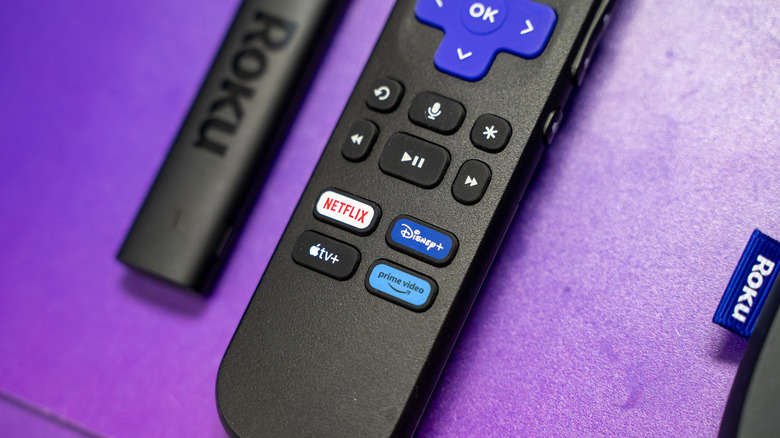
Close up of the Roku voice remote with the microphone icon visible.

Erman Gunes/Shutterstock

We may receive a commission on purchases made from links.

Before you can use a universal remote with pretty much any device, you have to program it. Often that involves cycling through a series of program codes or button presses until you find one that works. Fortunately, with Roku devices, you don’t have to do anything so complex. Standard Roku remotes work out of the box as long as you have batteries, so you should be good to go with no pairing necessary. However, things are a little different with the Roku voice remote, the upgraded model that allows you to issue voice commands. Your voice remote may need to be programmed and paired with your Roku devices, but the good news is that learning how to program a Roku remote is pretty easy.

First, you’ll need to ascertain if you have a voice remote or a standard one, and determining so is as simple as looking at the buttons on the remote. If your Roku remote has a small button below the directional pad with a microphone or magnifying glass icon, then it’s a voice remote. Program your new voice remote should be quick and easy, and to get started, you’ll need to put both your Roku device and remote in pairing mode.

What if pairing fails during setup?
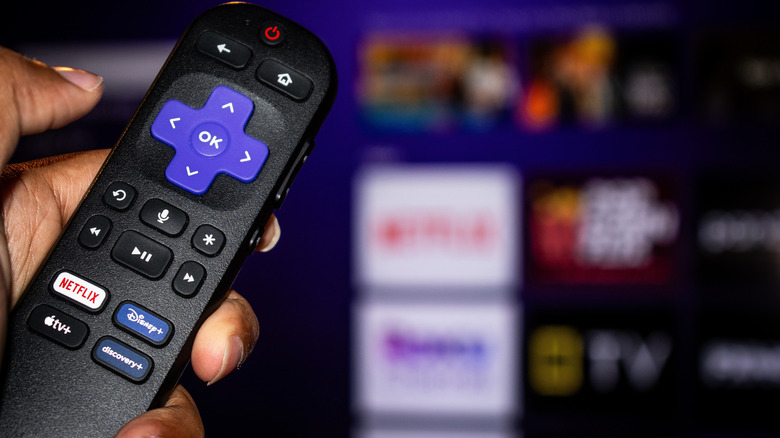
Roku voice remote held up in front of a TV with the streaming UI in the background.

Charles-McClintock Wilson/Shutterstock

On your Roku, with another working remote or using the free Roku remote app on a phone, go to Settings > Remotes & Devices > Add Devices > Remote > Continue. If the remote is brand new it’s likely already in pairing mode. Follow the onscreen instructions to sync the devices. If the remote is not already in pairing mode, flip it over and look for a small button located on the back or under the battery cover. Press and hold the button for five seconds until the status light starts blinking. If it’s an older voice remote with no pairing button, you can hold the Back and Home buttons together for five seconds.

If you do run into problems, there are ways to troubleshoot. Above all, you’ll want to make sure both your remote and the device, whether it’s a Roku TV or Roku standalone player, are in pairing mode following the appropriate instructions. If that still doesn’t work, follow the age-old power off and back on tip, restarting your streaming device or TV and then starting over from scratch with the pairing process.

There is a small chance interference is causing the sync issues between devices. If applicable, make sure you move other electronics away from your Roku device, including game consoles, routers, mesh nodes, other media players and even audio systems. Try pairing again after those devices have been moved away and then once everything is connected, you can move them back. Roku support says as a last resort you can simply use the Roku mobile app on your phone.

What does the voice remote do and why does it need to be paired?

Taking a step back, before you learn how to program a Roku remote, it’s a good idea to consider which are the best and which are the worst. Moreover, with each iteration there are new shortcut buttons added and they’re permanent for as long as you have the remote — they’re not customizable — so what you see is what you get. All voice remotes, including regular voice, enhanced and the voice remote pro, have to be paired with your Roku, especially if you already have another remote connected.

There are actually a couple of voice remote versions. The regular and enhanced voice remotes look and work a lot like the basic remote, and they take replaceable batteries. The $30 Roku Voice Remote Pro has a built-in rechargeable battery, as well as backlit buttons, hands-free voice controls, and a lost-remote finder. If you want to dig into the real differences between the remote styles a good old-fashioned head-to-head pitting the Roku simple remote versus the voice remote. Really, the biggest feature is the use of voice commands to navigate Roku’s noisy UI without tapping a bunch of buttons.

Share This Article
Email Copy Link Print
Previous Article How To Improve Xbox Series X’s Audio Quality How To Improve Xbox Series X’s Audio Quality
Next Article 5 Amazon Best-Selling Home Projector Screens Actually Worth Buying 5 Amazon Best-Selling Home Projector Screens Actually Worth Buying
Leave a Comment

Leave a ReplyCancel reply

FacebookLike
XFollow
InstagramFollow
LinkedInFollow
MediumFollow
RSS FeedFollow
Most Read
Global stocks inch up, oil steady before US CPI

Global stocks inch up, oil steady before US CPI

Walmart explains why it isn’t racing to close its biggest gap with Amazon on next-day delivery

Walmart explains why it isn’t racing to close its biggest gap with Amazon on next-day delivery

What your out-of-office really means

What your out-of-office really means

The White House is said to be vetting Judy Shelton for a seat on the Fed. She told us what she would bring to a central bank whose policies she has long criticized.

The White House is said to be vetting Judy Shelton for a seat on the Fed. She told us what she would bring to a central bank whose policies she has long criticized.

Entrepreneurs Need a Marketing Audit. These 7 Questions Show What to Fund and What to Cut

Entrepreneurs Need a Marketing Audit. These 7 Questions Show What to Fund and What to Cut

5 Not-So-Crazy Bitcoin Theories Revealed by Alex ‘Satoshi’ Jones

5 Not-So-Crazy Bitcoin Theories Revealed by Alex ‘Satoshi’ Jones

Micron (MU) Stock Is Back Near $1,000 and Wall Street Thinks It Has Much Further to Go

Micron (MU) Stock Is Back Near $1,000 and Wall Street Thinks It Has Much Further to Go

American Airlines cancels flights on Boeing’s embattled 737 Max through September as the carrier’s $350 million headache gets worse

American Airlines cancels flights on Boeing’s embattled 737 Max through September as the carrier’s $350 million headache gets worse

Belgium student unearths  ₹99-crore gold stash during routine sewer work under former brewery. But he can’t keep it

Belgium student unearths ₹99-crore gold stash during routine sewer work under former brewery. But he can’t keep it

The next Xbox is scheduled to arrive in ‘holiday 2020’ — here are the 5 most important things we just learned about ‘Project Scarlett’

The next Xbox is scheduled to arrive in ‘holiday 2020’ — here are the 5 most important things we just learned about ‘Project Scarlett’

Related News
4 Google Maps tasks that are easier on a PC
Gadgets

4 Google Maps tasks that are easier on a PC

Bringing ice sheets to life: Releasing a dynamic ice sheet modeling workflow for Australia’s climate model
Gadgets

Bringing ice sheets to life: Releasing a dynamic ice sheet modeling workflow for Australia’s climate model

European Central Bank President Blocked Binance’s EU Entry: Report
Gadgets

European Central Bank President Blocked Binance’s EU Entry: Report

CFTC Sends Proposal To Regulate Crypto Transactions Following Clarity Act Fail
Gadgets

CFTC Sends Proposal To Regulate Crypto Transactions Following Clarity Act Fail

Bitcoin Price Surges Over $81,000 Despite Clarity Act Fail and Interest Rate Hike
Gadgets

Bitcoin Price Surges Over $81,000 Despite Clarity Act Fail and Interest Rate Hike

  • Quick Links:
  • SPORTS
  • Business
  • Gadgets
  • HEALTH
  • NEWS
  • ENTERTAINMENT
  • America News
  • Virtual Reality
  • Travel
  • WORLD NEWS
  • News World
  • Global Affairs
  • POLITICS
  • Africa News
  • Tech
Bioreports
Information You Can Trust: Stay instantly connected with breaking stories and live updates. From politics and technology to entertainment and beyond, we provide real-time coverage you can rely on, making us your dependable source for 24/7 news.
Quick Links
  • Read History
  • Economy
  • Travel
  • Global Security
  • Global Affairs
  • World
  • Technology

© Bioreports News Network. . All Rights Reserved.