Bioreports
Sunday, 20 Sep 2026
  • Home
  • POLITICS
  • SPORTS
  • HEALTH
  • BUSINESS
  • ENTERTAINMENT
    • Fashion
    • Fitness
    • Food
    • Travel
Newsletter
  • news
  • update
  • life style
  • tech
  • fitness
  • fashion
  • travel
  • food
BioreportsBioreports
Font ResizerAa
  • Home
  • Read History
  • Economy
  • Travel
  • Global Security
  • Global Affairs
  • World
  • Technology
  • Login
  • Blog
  • Contact
Search
  • Pages
    • Blog Index
    • Contact Us
    • Search Page
    • 404 Page
  • Pages
    • Home
    • Blog Index
    • Contact Us
    • Search Page
    • 404 Page
  • Pages
    • Home
    • Blog Index
    • Contact Us
    • Search Page
    • 404 Page
  • Personalized
    • Read History
  • Personalized
    • Read History
  • Personalized
    • Read History
  • Categories
    • Economy
    • Global Affairs
    • Technology
    • Travel
    • Global Security
  • Categories
    • Economy
    • Global Affairs
    • Technology
    • Travel
    • Global Security
  • Categories
    • Economy
    • Global Affairs
    • Technology
    • Travel
    • Global Security
Have an existing account? Sign In
Follow US
© 2026 Foxiz News Network. Ruby Design Company. All Rights Reserved.
Gadgets

How To Improve Xbox Series X’s Audio Quality

admin
Last updated: September 20, 2026 2:09 am
By
admin
Share
6 Min Read
How To Improve Xbox Series X’s Audio Quality
SHARE

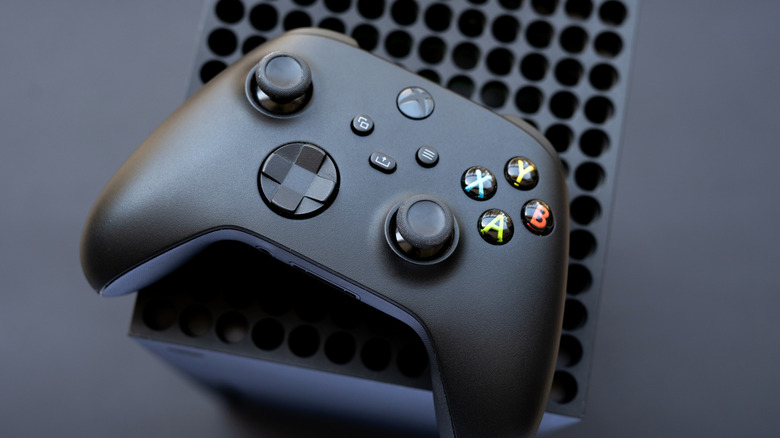
Xbox Series X controller on top of console with black background

vfhnb12/Shutterstock

We may receive a commission on purchases made from links.

The Xbox Series X (and, by extension, the Series S) is a solid, robust console. What it lacks in exclusive titles, the Series X more than makes up for with backward compatibility and a smaller footprint on your entertainment center. However, like any console, the out-of-the-box experience might not be ideal for your specific setup.

The Xbox Series X comes standard with many audio settings. Open the Settings menu (the gear at the top of the screen), then go to General and select Volume & audio output. Under the Speaker audio and Headset audio dropdown menus, you can pick several options. Audio starts as Stereo uncompressed, but you can pick alternatives such as 5.1 uncompressed and Dolby Digital for speakers and Dolby Atmos for Headphones and DTS Headphone:X for headsets.

If you don’t know which speaker settings to use, select Audio setup in the Advanced column. The console will run different audio formats through your speakers. Highlight the one you want to test, listen to the results, and pick the format you think sounds best. You can also select Audio testing & details to see which formats your setup supports. But for the most part, you are on your own if you want to get the most out of your console.

Soundbars and subscriptions sold separately

While the Xbox Series X/Series S has plenty of potential to transform into an audio powerhouse, it’s up to you, the user, to realize that potential. You need the tools to unlock the full scope of these settings, which is just capitalism jargon for “buy the right peripherals.”

Even though the Xbox Series X can output sound using Dolby Digital and Dolby Atmos, your console will refuse to activate the setting unless it detects speakers that are compatible with these formats. This usually means buying soundbars and surround sound systems — Dolby Atmos specifically requires a home theater setup. Soundbars are less expensive and take up less space, but if you want a true 3D audio environment that puts you in the middle of the action, you will need a surround sound setup. Also, make sure your sound system is plugged into the right port (and that you’re using an HDMI 2.1 cable or later) to get the most out of the audio settings.

Headphones, meanwhile, are even more complicated. First, you need to buy the right one. Unless a headset is built for the Xbox Series X/S, you can only use it via a wired connection (which isn’t a dealbreaker, since plenty of wired headsets provide delicious audio). But even then, you are limited to uncompressed stereo and Windows Sonic unless you buy a license for Dolby Atmos for Headphones or a DTS Headphone:X subscription. So that’s an extra, potentially recurring, expenditure on top of the headphones, especially if you want 3D audio.

Proper communication is vital to a successful match

Gaming headsets let you play games without disturbing anyone else in the room or the house. Unless you play “Elden Ring” and scream in frustration because Malenia killed you for the 25th time, but that’s on you. More importantly, headsets often include built-in microphones that let you chat with allies. Assuming you can actually hear one another.

If you are a competitive multiplayer aficionado, you need to tweak your Xbox Series X’s chat settings, which are located in the Additional options tab under Advanced in Volume & audio output. The first option, Chat mixer, lets you adjust the volume of all other sounds so you can hear your squadmates more clearly. While you can mute the game entirely during chats, this setting isn’t ideal for titles that provide audio cues to locate enemies. You can also use Party chat output to change where party chat audio comes from, including your headset, speakers, or both.

Many high-end headsets include dials and buttons that let you tweak settings such as chat/audio mixing, so don’t solely rely on the Xbox’s audio options. Also, some settings don’t cooperate well with others. For instance, if you want to route all audio through the headset, you need to activate the Mute speaker audio when headset attached option in the Additional options menu. But if you do that, toggling Speakers as your Party chat output will effectively mute your teammates, rendering proper communication impossible. Be prepared for some trial and error to find your perfect audio settings.

Share This Article
Email Copy Link Print
Previous Article You Can Try Out New Amazon Fire TV Features Before They Release You Can Try Out New Amazon Fire TV Features Before They Release
Next Article How To Program Your Roku Remote How To Program Your Roku Remote
Leave a Comment

Leave a ReplyCancel reply

FacebookLike
XFollow
InstagramFollow
LinkedInFollow
MediumFollow
RSS FeedFollow
Most Read
‘The world is not yet ready for DeepNude’: The disturbing deepfake app for making fake nudes of any woman with just a few clicks has been shut down

‘The world is not yet ready for DeepNude’: The disturbing deepfake app for making fake nudes of any woman with just a few clicks has been shut down

Crowne Plaza Manhattan Times Square opens after renovation

Crowne Plaza Manhattan Times Square opens after renovation

The 50 worst commutes in America, ranked

The 50 worst commutes in America, ranked

Lagarde enters French election debate as ECB exit speculation grows

Lagarde enters French election debate as ECB exit speculation grows

Meet the average American millennial, who has an $8,000 net worth, is delaying life milestones because of student loan debt, and still relies on their parents for money

Meet the average American millennial, who has an $8,000 net worth, is delaying life milestones because of student loan debt, and still relies on their parents for money

A German founder’s case for why America still needs immigrants

A German founder’s case for why America still needs immigrants

All the countries where someone managed to shut down the entire internet — and why they did it

All the countries where someone managed to shut down the entire internet — and why they did it

Senate Sets September 15 Vote on Revised CLARITY Act

Senate Sets September 15 Vote on Revised CLARITY Act

Tesla’s investigation confirms a Model S that caught fire on video in Shanghai had a faulty battery module

Tesla’s investigation confirms a Model S that caught fire on video in Shanghai had a faulty battery module

Sensex Today | Stock Market Live Updates: Nifty slumps below 23,300; market extends losses

Sensex Today | Stock Market Live Updates: Nifty slumps below 23,300; market extends losses

Related News
4 Google Maps tasks that are easier on a PC
Gadgets

4 Google Maps tasks that are easier on a PC

Bringing ice sheets to life: Releasing a dynamic ice sheet modeling workflow for Australia’s climate model
Gadgets

Bringing ice sheets to life: Releasing a dynamic ice sheet modeling workflow for Australia’s climate model

European Central Bank President Blocked Binance’s EU Entry: Report
Gadgets

European Central Bank President Blocked Binance’s EU Entry: Report

CFTC Sends Proposal To Regulate Crypto Transactions Following Clarity Act Fail
Gadgets

CFTC Sends Proposal To Regulate Crypto Transactions Following Clarity Act Fail

Bitcoin Price Surges Over $81,000 Despite Clarity Act Fail and Interest Rate Hike
Gadgets

Bitcoin Price Surges Over $81,000 Despite Clarity Act Fail and Interest Rate Hike

  • Quick Links:
  • SPORTS
  • Business
  • Gadgets
  • HEALTH
  • NEWS
  • ENTERTAINMENT
  • America News
  • Virtual Reality
  • Travel
  • WORLD NEWS
  • News World
  • Global Affairs
  • POLITICS
  • Africa News
  • Tech
Bioreports
Information You Can Trust: Stay instantly connected with breaking stories and live updates. From politics and technology to entertainment and beyond, we provide real-time coverage you can rely on, making us your dependable source for 24/7 news.
Quick Links
  • Read History
  • Economy
  • Travel
  • Global Security
  • Global Affairs
  • World
  • Technology

© Bioreports News Network. . All Rights Reserved.