Bioreports
Tuesday, 1 Sep 2026
  • Home
  • POLITICS
  • SPORTS
  • HEALTH
  • BUSINESS
  • ENTERTAINMENT
    • Fashion
    • Fitness
    • Food
    • Travel
Newsletter
  • news
  • update
  • life style
  • tech
  • fitness
  • fashion
  • travel
  • food
BioreportsBioreports
Font ResizerAa
  • Home
  • Read History
  • Economy
  • Travel
  • Global Security
  • Global Affairs
  • World
  • Technology
  • Login
  • Blog
  • Contact
Search
  • Pages
    • Blog Index
    • Contact Us
    • Search Page
    • 404 Page
  • Pages
    • Home
    • Blog Index
    • Contact Us
    • Search Page
    • 404 Page
  • Pages
    • Home
    • Blog Index
    • Contact Us
    • Search Page
    • 404 Page
  • Personalized
    • Read History
  • Personalized
    • Read History
  • Personalized
    • Read History
  • Categories
    • Economy
    • Global Affairs
    • Technology
    • Travel
    • Global Security
  • Categories
    • Economy
    • Global Affairs
    • Technology
    • Travel
    • Global Security
  • Categories
    • Economy
    • Global Affairs
    • Technology
    • Travel
    • Global Security
Have an existing account? Sign In
Follow US
© 2026 Foxiz News Network. Ruby Design Company. All Rights Reserved.
Gadgets

What Do The Lights On An Anker Power Bank Mean?

admin
Last updated: August 31, 2026 9:09 pm
By
admin
Share
6 Min Read
What Do The Lights On An Anker Power Bank Mean?
SHARE

Anker has been praised time and time again for its wide range of high-quality chargers and portable battery packs. In fact, some Anker accessories outperform their competitors while also offering several nifty features. One of these convenient features is a small display integrated into some of the Anker power bank models. It might seem like a minor part of the overall design, but it’s particularly handy when you’d like to know the status of the device. Instead of guessing what the current battery level is or whether the power bank is charging as expected, all you have to do is simply glance at the screen. 

But what if your Anker power bank doesn’t come with a built-in display? In that case, you can check its LED indicators instead. The lights on your Anker power bank can tell you the status of the device based on which ones are lit. Generally, there are three types of LED indicators on Anker power banks: battery level indicators, a trickle charging mode indicator, and a wireless charging mode indicator. We’ll go over what each of these Anker power bank lights means.

Battery level lights
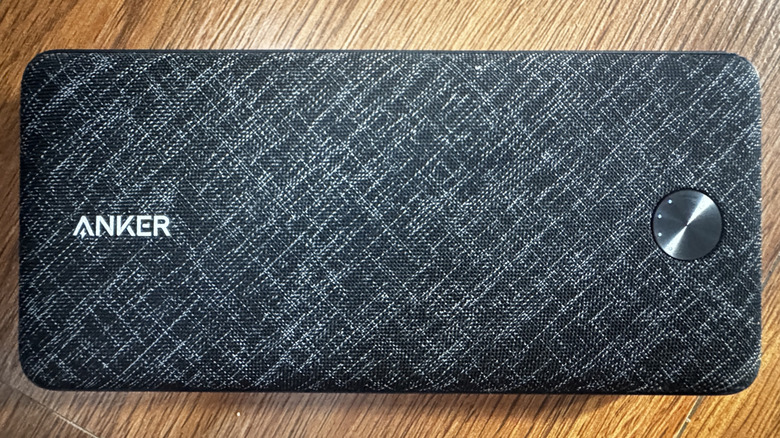
An Anker power bank showing battery indicator lights around the power button

Marinel Sigue/BGR

The four consecutive LEDs on your Anker power bank — usually arranged in a straight line or curved around the button — are the indicators for the current battery level. You’ll find these four lights on the front of models like the Anker Nano A1653 and Anker PowerCore A1229, or on the bottom of models like the Anker MagGo A1611 and Anker Zolo A1684. 

These four battery level lights on your Anker power bank tell you how much charge is left. If only one LED indicator is on, it means the current battery level is between zero and 25%. Two lights mean 25% to 50%, three lights mean 50% to 75%, and four lights mean 75% to 100%. The power bank won’t show these battery level indicators all the time, though. To view the current battery level, you need to press the power button once. 

The battery level indicators also light up automatically whenever you’re charging your phone or other devices either on the pad of the wireless power bank or via cable. Once the indicators turn off, that means your device is fully charged. When you’re charging the Anker power bank itself, you’ll see the battery level indicators illuminate as well. If it’s below 25% when you plug it in, the first LED will blink while the rest are off. As soon as the power bank reaches 25%, the first LED becomes solid, and the second LED starts blinking. This continues until the battery is fully charged, at which point all LEDs turn off.

Charging mode lights

An Anker power bank showing a green trickle charging mode light

Marinel Sigue/BGR

Other than the battery level lights, your Anker power bank also has specific lights for two charging modes: trickle charging and wireless charging. Anker’s trickle charging mode enables the power bank to detect and charge small electronics like microphones, wireless earbuds, and smartwatches, which would otherwise go unrecognized due to their small power draw. To make sure they charge properly, you’d need to enable trickle charging mode by double-pressing the power button.

You’ll know trickle charging mode is on when you see the corresponding LED — a solid green or blue dot — on your Anker power bank. It appears next to or above the battery percentage on the built-in display of models like the Anker Prime A1340, Anker Zolo A1688, and Anker MagGo A1657. If your Anker power bank doesn’t come with a display, one of the battery level indicators will turn green instead. This is the case for models like the Anker PowerCore A1229. When you’re done trickle charging, you can then disable the mode. Simply press the power button once or twice, depending on the model. This should also turn off the solid blue or green light on your Anker power bank.

On the other hand, the wireless charging mode light indicates the power bank’s wireless charging status. This indicator automatically lights up when you place your phone on the power bank. If it doesn’t, you can enable wireless charging mode manually by pressing the power button. The LED will then flash, which means that wireless charging was turned on. Then, when you put your phone on the power bank, the wireless charging mode light turns solid. If you see the battery level lights flash from left to right, though, that means the connection to your phone is unstable and needs adjustment.


Share This Article
Email Copy Link Print
Previous Article 5 Common 3D Printing Issues And How To Fix Them 5 Common 3D Printing Issues And How To Fix Them
Next Article What’s next for Roman Space Telescope? Here’s how NASA’s flagship observatory will open up the universe What’s next for Roman Space Telescope? Here’s how NASA’s flagship observatory will open up the universe
Leave a Comment

Leave a ReplyCancel reply

FacebookLike
XFollow
InstagramFollow
LinkedInFollow
MediumFollow
RSS FeedFollow
Most Read
Serum Price Prediction 2026,2027-2030: Is SRM Still Worth Holding?

Serum Price Prediction 2026,2027-2030: Is SRM Still Worth Holding?

Crypto Spring Has Arrived & Institutional Money Will Move In: Barry Silbert

Crypto Spring Has Arrived & Institutional Money Will Move In: Barry Silbert

Treasury’s latest measure isn’t QE or YCC. Still, bitcoin is skyrocketing. Here’s why.

Treasury’s latest measure isn’t QE or YCC. Still, bitcoin is skyrocketing. Here’s why.

Trump and Xi are supposed to meet at the upcoming G20 summit. Here’s why experts say the outcome will dictate the fate of the entire stock market.

Trump and Xi are supposed to meet at the upcoming G20 summit. Here’s why experts say the outcome will dictate the fate of the entire stock market.

The Sandbox Contains Bridge Exploit After Unbacked SAND Minted on Base and BSC

The Sandbox Contains Bridge Exploit After Unbacked SAND Minted on Base and BSC

Uber’s self-driving CEO says the company needs robo-taxis because it can’t grow its fleet of human drivers fast enough

Uber’s self-driving CEO says the company needs robo-taxis because it can’t grow its fleet of human drivers fast enough

Panama-flagged bulk carrier sinks in Bay of Bengal off Odisha; 24 crew onboard, 2 rescued

Panama-flagged bulk carrier sinks in Bay of Bengal off Odisha; 24 crew onboard, 2 rescued

Amazon & Alibaba Trade Blows in War for China’s E-commerce Throne

Amazon & Alibaba Trade Blows in War for China’s E-commerce Throne

Tezos Price Prediction 2026, 2027 – 2030: How High Will XTZ Price Go?

Tezos Price Prediction 2026, 2027 – 2030: How High Will XTZ Price Go?

JPMorgan has cut nearly two-dozen people in a group responsible for preventing traders from making risky bets

JPMorgan has cut nearly two-dozen people in a group responsible for preventing traders from making risky bets

Related News
What’s next for Roman Space Telescope? Here’s how NASA’s flagship observatory will open up the universe
Gadgets

What’s next for Roman Space Telescope? Here’s how NASA’s flagship observatory will open up the universe

5 Common 3D Printing Issues And How To Fix Them
Gadgets

5 Common 3D Printing Issues And How To Fix Them

SpaceX, NASA delay next astronaut launch to ISS due to leak on Dragon spacecraft
Gadgets

SpaceX, NASA delay next astronaut launch to ISS due to leak on Dragon spacecraft

120Hz Doesn’t Equal 120FPS: Here’s How They’re Different
Gadgets

120Hz Doesn’t Equal 120FPS: Here’s How They’re Different

On this day in space! Aug. 31, 1965: NASA’s ginormous Super Guppy carrier plane takes 1st flight like a flying whale
Gadgets

On this day in space! Aug. 31, 1965: NASA’s ginormous Super Guppy carrier plane takes 1st flight like a flying whale

  • Quick Links:
  • SPORTS
  • Business
  • HEALTH
  • Gadgets
  • NEWS
  • ENTERTAINMENT
  • Virtual Reality
  • WORLD NEWS
  • News World
  • POLITICS
  • America News
  • Travel
  • Global Affairs
  • Africa News
  • Tech
Bioreports
Information You Can Trust: Stay instantly connected with breaking stories and live updates. From politics and technology to entertainment and beyond, we provide real-time coverage you can rely on, making us your dependable source for 24/7 news.
Quick Links
  • Read History
  • Economy
  • Travel
  • Global Security
  • Global Affairs
  • World
  • Technology

© Bioreports News Network. . All Rights Reserved.