Bioreports
Tuesday, 18 Aug 2026
  • Home
  • POLITICS
  • SPORTS
  • HEALTH
  • BUSINESS
  • ENTERTAINMENT
    • Fashion
    • Fitness
    • Food
    • Travel
Newsletter
  • news
  • update
  • life style
  • tech
  • fitness
  • fashion
  • travel
  • food
BioreportsBioreports
Font ResizerAa
  • Home
  • Read History
  • Economy
  • Travel
  • Global Security
  • Global Affairs
  • World
  • Technology
  • Login
  • Blog
  • Contact
Search
  • Pages
    • Blog Index
    • Contact Us
    • Search Page
    • 404 Page
  • Pages
    • Home
    • Blog Index
    • Contact Us
    • Search Page
    • 404 Page
  • Pages
    • Home
    • Blog Index
    • Contact Us
    • Search Page
    • 404 Page
  • Personalized
    • Read History
  • Personalized
    • Read History
  • Personalized
    • Read History
  • Categories
    • Economy
    • Global Affairs
    • Technology
    • Travel
    • Global Security
  • Categories
    • Economy
    • Global Affairs
    • Technology
    • Travel
    • Global Security
  • Categories
    • Economy
    • Global Affairs
    • Technology
    • Travel
    • Global Security
Have an existing account? Sign In
Follow US
© 2026 Foxiz News Network. Ruby Design Company. All Rights Reserved.
Gadgets

How To Use TTY Mode On Your Google Pixel

admin
Last updated: August 17, 2026 8:38 pm
By
admin
Share
6 Min Read
How To Use TTY Mode On Your Google Pixel
SHARE

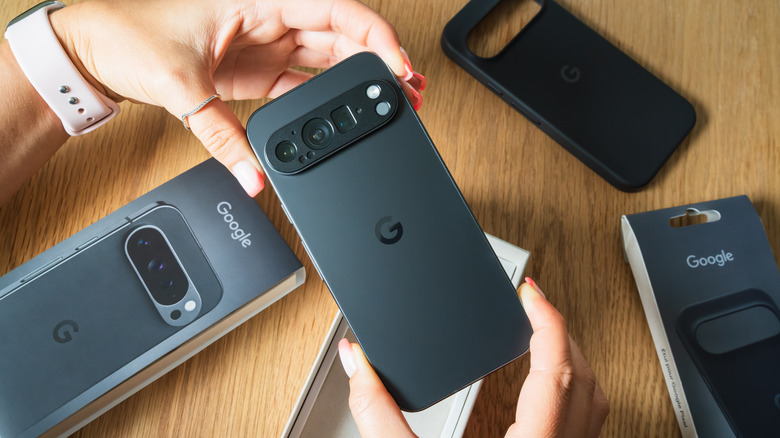
Person holding a Google Pixel phone in both hands with accessories on the table behind it

Dmitri T/Shutterstock

TTY mode, also known as “Teletypewriter” or “Text Telephone” mode, is a specific accessibility setting in your Google Pixel’s Phone app. It’s used to facilitate text-to-audio communication by those who are hard of hearing or have a speech impairment by sending and displaying typed text on the screen of a TTY-compatible device. Still, despite the intended function of this mode, it’s not the same as RTT (or “real-time text”) mode, which transmits text character-by-character during an active call. TTY is somewhat of a legacy function, one of those Pixel features you have to manually enable in the Google Phone app and on external hardware. But if you have the hardware to make it work, modern phones like the Google Pixel 10 or 10 Pro can support it, instead of relying on a landline.

Unless your TTY hardware supports Bluetooth, you’ll likely need an adapter to connect your phone to the system. Thankfully, since a USB-C headphone jack dongle is generally all you need, the adapter shouldn’t cost you much more than $10, maybe $15 at most. But buying a TTY device for the first time can be pricey. If you already have these prerequisites and everything is connected directly to your phone, all you need to do to enable TTY mode is open the default Phone app, tap the hamburger button (three horizontal lines) next to the search bar, and then head to Settings > Accessibility. From there, tap TTY mode and select one of the radio options to turn it on.

How does TTY mode work, and which setting should you select?
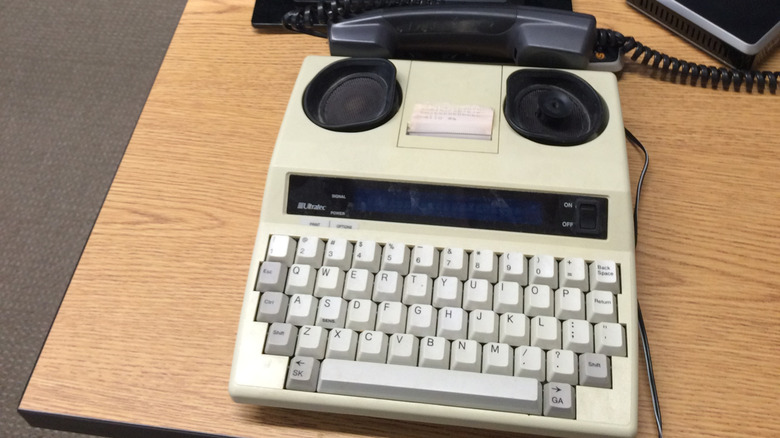
An old TTY machine on a desk connected to a landline

Andy128/Shutterstock

Once you have it TTY enabled, you can begin using your TTY device to communicate; the connected display should show the text contents of your call. The other person may use TTY mode, or TTY users can place calls to standard phone users via telecommunications relay services to access a communication assistant that relays text to voice or vice versa.

TTY in the Google Pixel’s Phone app gives four options to select from: TTY Full, TTY HCO, TTY VCO, and TTY Off. TTY Full means both the caller and recipient intend to text-communicate with each other, either through a TTY device or via a telecommunications relay service operator. TTY HCO refers to “hearing carry over,” which means the recipient will likely use audio to communicate. The TTY user listens directly to the natural voice, but is also using the TTY setup to reply via text. TTY VCO stands for “voice carry over,” essentially the opposite of HCO, where you plan to use audio, and then the recipient responds in text (requiring you to read the incoming text on your display). Lastly, TTY Off, the default option, disables TTY mode and treats a call as one where both parties are set up to communicate via audio.

TTY HCO suits users who have difficulty speaking but can hear properly, while TTY VCO suits those who can speak but have difficulty hearing. So you’ll want to select the option that complements the impairment level. If there’s difficulty with both hearing and speaking, TTY Full should be considered, since it relies on full text to facilitate the conversation.

Alternatives to TTY mode for Android phones

An image displaying chat bubble and messages over a phone

Carme Parramon/Getty Images

If you’re looking for options that promote easier communication but don’t necessarily have a supported TTY device, you should consider other avenues on your device. The right one depends on what exactly you’re trying to accomplish, but a more common digital replacement is RTT. This feature works similarly to TTY, but instead of using the TTY device’s display, it operates solely on your phone’s screen and also uses your cellular data. The audio is also simultaneous, so you can talk, listen, or mute the microphone when needed. Plus, you can do all of this without using an operator unless you call a line that doesn’t support text. RTT can be enabled before a call and swapped mid-call, so it’s a little more flexible.

IP relay service is another alternative that uses the internet to communicate while connecting to an operator. This can be done through the web or even through an app. It doesn’t need any setup, except for being connected to stable internet, and then accessing an operator to facilitate the call.

Video relay services are also a good option. But this method does require downloading an app like Ntouch by Sorenson for a subsidized experience. The app does assume that the user will primarily use sign language to communicate, but each call you make through the platform remains encrypted.

Share This Article
Email Copy Link Print
Previous Article Should You Switch To A Smaller Physical Keyboard? Here’s What Users Say Should You Switch To A Smaller Physical Keyboard? Here’s What Users Say
Next Article The 1st ‘Star Wars: Ahsoka’ season 2 trailer finally gives us a release date (video) The 1st ‘Star Wars: Ahsoka’ season 2 trailer finally gives us a release date (video)
Leave a Comment

Leave a ReplyCancel reply

FacebookLike
XFollow
InstagramFollow
LinkedInFollow
MediumFollow
RSS FeedFollow
Most Read
Bomb kills three and wounds 21 at central Moscow restaurant

Bomb kills three and wounds 21 at central Moscow restaurant

Argentina’s farm exports fall 28% in July to $2.92 billion

Argentina’s farm exports fall 28% in July to $2.92 billion

Coinbase to Move Institutional Clients to Deribit Ahead of September Migration

Coinbase to Move Institutional Clients to Deribit Ahead of September Migration

Cloudflare Unveils AI Wallets Built to Spend Without Humans

Cloudflare Unveils AI Wallets Built to Spend Without Humans

Air Peace orders 30 Embraer jets worth N641 billion

Crypto Bull Market Can Continue Without CLARITY Act, Bitwise CIO Predicts

Crypto Bull Market Can Continue Without CLARITY Act, Bitwise CIO Predicts

Dozens of naked people, holding up images of nipples, stood outside Facebook to protest against its ban on nudity

Dozens of naked people, holding up images of nipples, stood outside Facebook to protest against its ban on nudity

Honeywell Aerospace lands in Wall Street’s ‘penalty box’ after gloomy guidance triggers 21% stock selloff

Honeywell Aerospace lands in Wall Street’s ‘penalty box’ after gloomy guidance triggers 21% stock selloff

Apple just took a direct shot at Google and Facebook with a new service called ‘Sign in with Apple’

Apple just took a direct shot at Google and Facebook with a new service called ‘Sign in with Apple’

SEALSQ Corp (LAES) Stock: Rise as $200 Million Quantum Plan Advances

SEALSQ Corp (LAES) Stock: Rise as $200 Million Quantum Plan Advances

Related News
Investors Cash Out Fast of Bitcoin ETFs but Price Remains Stable
Gadgets

Investors Cash Out Fast of Bitcoin ETFs but Price Remains Stable

US Treasury Asks For Public Input on Landmark Genius Act Crypto Legislation 
Gadgets

US Treasury Asks For Public Input on Landmark Genius Act Crypto Legislation 

Strategy Goes Another Week Without Buying — Or Selling — Bitcoin, Builds Up Cash Reserve 
Gadgets

Strategy Goes Another Week Without Buying — Or Selling — Bitcoin, Builds Up Cash Reserve 

Don’t worry, Katmai’s brown bears didn’t vanish from Brooks Falls
Gadgets

Don’t worry, Katmai’s brown bears didn’t vanish from Brooks Falls

TikTok helps scientists discover new underground, translucent eel in India
Gadgets

TikTok helps scientists discover new underground, translucent eel in India

  • Quick Links:
  • SPORTS
  • Business
  • HEALTH
  • NEWS
  • ENTERTAINMENT
  • Gadgets
  • Virtual Reality
  • WORLD NEWS
  • POLITICS
  • News World
  • Travel
  • Global Affairs
  • America News
  • Africa News
  • Tech
Bioreports
Information You Can Trust: Stay instantly connected with breaking stories and live updates. From politics and technology to entertainment and beyond, we provide real-time coverage you can rely on, making us your dependable source for 24/7 news.
Quick Links
  • Read History
  • Economy
  • Travel
  • Global Security
  • Global Affairs
  • World
  • Technology

© Bioreports News Network. . All Rights Reserved.