

Bioreports
Tuesday, 8 Sep 2026
  • Home
  • POLITICS
  • SPORTS
  • HEALTH
  • BUSINESS
  • ENTERTAINMENT
    • Fashion
    • Fitness
    • Food
    • Travel
Newsletter
  • news
  • update
  • life style
  • tech
  • fitness
  • fashion
  • travel
  • food
BioreportsBioreports
Font ResizerAa
  • Home
  • Read History
  • Economy
  • Travel
  • Global Security
  • Global Affairs
  • World
  • Technology
  • Login
  • Blog
  • Contact
Search
  • Pages
    • Blog Index
    • Contact Us
    • Search Page
    • 404 Page
  • Pages
    • Home
    • Blog Index
    • Contact Us
    • Search Page
    • 404 Page
  • Pages
    • Home
    • Blog Index
    • Contact Us
    • Search Page
    • 404 Page
  • Personalized
    • Read History
  • Personalized
    • Read History
  • Personalized
    • Read History
  • Categories
    • Economy
    • Global Affairs
    • Technology
    • Travel
    • Global Security
  • Categories
    • Economy
    • Global Affairs
    • Technology
    • Travel
    • Global Security
  • Categories
    • Economy
    • Global Affairs
    • Technology
    • Travel
    • Global Security
Have an existing account? Sign In
Follow US
© 2026 Foxiz News Network. Ruby Design Company. All Rights Reserved.
Gadgets

How To Get The Best Gaming Performance With Nvidia Control Panel

admin
Last updated: September 7, 2026 10:08 pm
By
admin
Share
5 Min Read
How To Get The Best Gaming Performance With Nvidia Control Panel
SHARE

Nvidia logo shown on a phone resting on top of a keyboard.

Blossom Stock Studio/Shutterstock

PC hardware upgrades are, in many cases, prohibitively expensive these days. Some crafty enthusiasts have even gone so far as to make their own RAM in response to soaring prices. This makes squeezing the most performance you can out of your setup more important than ever, and tweaking a few settings in the Nvidia Control Panel can help you do just that. 

First things first, you can get to the Nvidia Control Panel by right-clicking on your desktop, choosing “Show more options,” and then clicking “Nvidia Control Panel.” This is separate from the Nvidia App, which lets you modify other game-related settings. Here, you’ll see a list of navigation options on the left-hand side. There are some settings you’ll want to enable for the best performance, and others you’ll want to make sure are disabled. Locate the “3D Settings” group in the navigation options (closest to the top of the list) — we’ll start here. 

Select the “Manage 3D Settings” option to open the Global Settings page. This is where you can edit a number of hardware-intensive options like ambient occlusion, anisotropic filtering, and more. Note that if you ever want to revert back to the default settings, there’s a “Restore” button beneath the settings options.

Best Nvidia Control Panel 3D Settings for performance
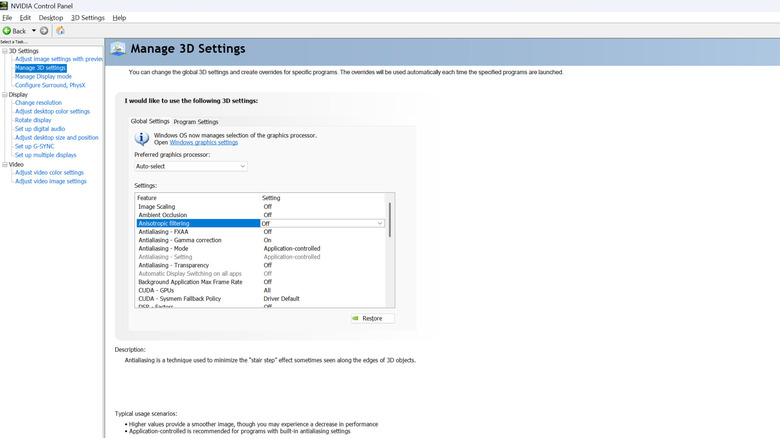
Nvidia Control Panel open to the Manage 3D Settings page.

Marcus Mears III/BGR

Leave “Image Scaling” and “Ambient Occlusion” disabled. Anisotropic filtering, which reduces blurriness of busy scenes, is the first setting you’ll want to change –- it’s likely set to “Application-controlled” by default, but for the best possible performance, set it to “Off.”

Leave all Antialiasing settings at default, as these have next to no impact on performance. Next up is “Background Application Max Framerate,” which can be a major boon if you have a dual- or triple-monitor setup. This, as the name suggests, throttles the FPS of any application that you don’t currently have in focus, so if you’re playing a game on your main monitor, you could limit background apps to 30FPS on your second monitor to reduce performance impact. The next setting to look at is “Low Latency Mode”, which isn’t as important nowadays because Nvidia Reflex is typically enabled in supported games already, but setting “Low Latency Mode” to “On” is a nice catch-all for performance improvements.

Max Framerate is another you’ll want to set for optimal performance. You want this set just below your monitor’s refresh rate. So if you have a 120Hz monitor, set the Max Framerate to 117 FPS. This helps minimize latency spikes, and you should experience more uniform gameplay. Next, under “Power Management Mode,” select “Prefer maximum performance.” Set “Texture Filtering – Anisotropic sample optimization” to “On” for better performance in DirectX programs. “Texture Filtering – Quality” should be set to “High performance” rather than “Quality.” Once you’ve changed the settings, make sure to click “Apply” at the bottom right of the window.

Other Nvidia Control Panel settings
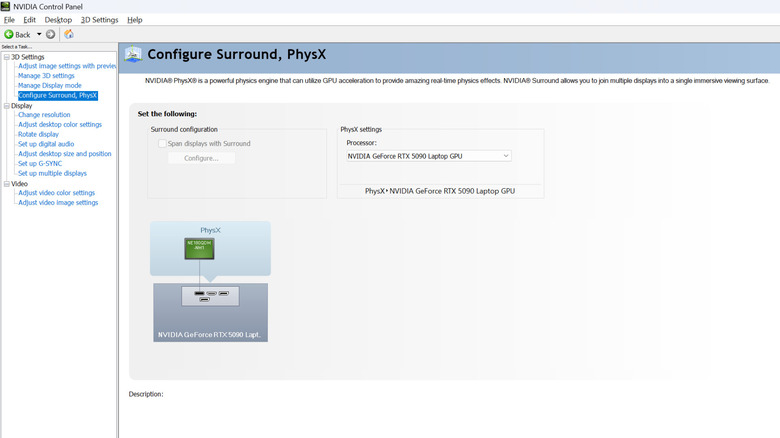
Nvidia Control Panel open to the Configure Surround, PhysX page.

Marcus Mears III/BGR

Head to “Configure Surround, PhysX” and make sure the PhysX setting is set to your GPU rather than Auto-select. Then, go to “Change Resolution” in the navigation menu and ensure your monitor is set to the proper resolution and the highest possible refresh rate.

Next, head to the “Adjust desktop size and position” menu and, if you’re not currently using a stretched resolution, set the scaling mode to “No scaling.” And that’s it! Those are the best Nvidia Control Panel settings for PC gaming. There are a number of other options you can adjust to get the best performance using the Nvidia App, such as configuring G-Sync and disabling global game optimization. Always be sure to double-check the in-game settings for performance killers like ray-tracing, high shadow quality, and volumetric effects. Outdated GPU drivers can have major performance impacts, too, so make sure they’re up to date!


Share This Article
Email Copy Link Print
Previous Article Wired Vs. Wireless Video Doorbells: Pros, Cons, And Differences Explained Wired Vs. Wireless Video Doorbells: Pros, Cons, And Differences Explained
Next Article Joint Revenue Board pushes data-driven tax system as reform challenges persist Joint Revenue Board pushes data-driven tax system as reform challenges persist
Leave a Comment

Leave a ReplyCancel reply

FacebookLike
XFollow
InstagramFollow
LinkedInFollow
MediumFollow
RSS FeedFollow
Most Read
Democratic states sue to block Paramount’s $110bn WBD acquisition

Democratic states sue to block Paramount’s $110bn WBD acquisition

Jensen Huang Says Coding Is No Longer the Ultimate Skill. Here’s What Matters Now

Jensen Huang Says Coding Is No Longer the Ultimate Skill. Here’s What Matters Now

Sonam Wangchuk hunger strike: Naseeruddin Shah, Arundhati Roy among signatories urging Centre to open dialogue

Sonam Wangchuk hunger strike: Naseeruddin Shah, Arundhati Roy among signatories urging Centre to open dialogue

Bitcoin Price Forecast (JULY): Experts Split Between $70K Rally and Deeper Correction 

Bitcoin Price Forecast (JULY): Experts Split Between $70K Rally and Deeper Correction 

Esports World Cup 2026 drives surge in crypto prediction market activity as JD Gaming advances to playoffs

Esports World Cup 2026 drives surge in crypto prediction market activity as JD Gaming advances to playoffs

The AI Trade Is Cracking: Why Chip Stocks Just Entered a Bear Market

The AI Trade Is Cracking: Why Chip Stocks Just Entered a Bear Market

CJP’s Abhijeet Dipke seeks PM Modi’s resignation, sits on indefinite hunger strike after police hospitalise Wangchuk

CJP’s Abhijeet Dipke seeks PM Modi’s resignation, sits on indefinite hunger strike after police hospitalise Wangchuk

Cyclosporiasis outbreak in US: Supplier Taylor Farms recalls lettuce sourced from central Mexico as thousands fall ill

Cyclosporiasis outbreak in US: Supplier Taylor Farms recalls lettuce sourced from central Mexico as thousands fall ill

XRP Signals Historical Pattern That Previously Sparked Major Rallies — Is It Happening Again?

XRP Signals Historical Pattern That Previously Sparked Major Rallies — Is It Happening Again?

US-Iran war news LIVE: Saudi Arabia condemns maritime blockade threat by Houthis; rebel group warns of escalation

US-Iran war news LIVE: Saudi Arabia condemns maritime blockade threat by Houthis; rebel group warns of escalation

Related News
I spent hours troubleshooting my TV until I found an outdated cable hiding behind it
Gadgets

I spent hours troubleshooting my TV until I found an outdated cable hiding behind it

How researchers are helping Canada understand a changing climate
Gadgets

How researchers are helping Canada understand a changing climate

White paper suggests 5 ways K–12 leaders can strengthen teacher recognition beyond appreciation weeks
Gadgets

White paper suggests 5 ways K–12 leaders can strengthen teacher recognition beyond appreciation weeks

These Mini PCs offer AI Performance and Retro Designs
Gadgets

These Mini PCs offer AI Performance and Retro Designs

This new Excel feature saves me from digging through change history
Gadgets

This new Excel feature saves me from digging through change history

  • Quick Links:
  • SPORTS
  • Business
  • Gadgets
  • HEALTH
  • NEWS
  • ENTERTAINMENT
  • Virtual Reality
  • America News
  • WORLD NEWS
  • Travel
  • News World
  • POLITICS
  • Global Affairs
  • Africa News
  • Tech
Bioreports
Information You Can Trust: Stay instantly connected with breaking stories and live updates. From politics and technology to entertainment and beyond, we provide real-time coverage you can rely on, making us your dependable source for 24/7 news.
Quick Links
  • Read History
  • Economy
  • Travel
  • Global Security
  • Global Affairs
  • World
  • Technology

© Bioreports News Network. . All Rights Reserved.