Bioreports
Monday, 3 Aug 2026
  • Home
  • POLITICS
  • SPORTS
  • HEALTH
  • BUSINESS
  • ENTERTAINMENT
    • Fashion
    • Fitness
    • Food
    • Travel
Newsletter
  • news
  • update
  • life style
  • tech
  • fitness
  • fashion
  • travel
  • food
BioreportsBioreports
Font ResizerAa
  • Home
  • Read History
  • Economy
  • Travel
  • Global Security
  • Global Affairs
  • World
  • Technology
  • Login
  • Blog
  • Contact
Search
  • Pages
    • Blog Index
    • Contact Us
    • Search Page
    • 404 Page
  • Pages
    • Home
    • Blog Index
    • Contact Us
    • Search Page
    • 404 Page
  • Pages
    • Home
    • Blog Index
    • Contact Us
    • Search Page
    • 404 Page
  • Personalized
    • Read History
  • Personalized
    • Read History
  • Personalized
    • Read History
  • Categories
    • Economy
    • Global Affairs
    • Technology
    • Travel
    • Global Security
  • Categories
    • Economy
    • Global Affairs
    • Technology
    • Travel
    • Global Security
  • Categories
    • Economy
    • Global Affairs
    • Technology
    • Travel
    • Global Security
Have an existing account? Sign In
Follow US
© 2026 Foxiz News Network. Ruby Design Company. All Rights Reserved.
Gadgets

How Many Stops Can You Plan On A Google Maps Route?

admin
Last updated: August 3, 2026 8:33 am
By
admin
Share
6 Min Read
How Many Stops Can You Plan On A Google Maps Route?
SHARE

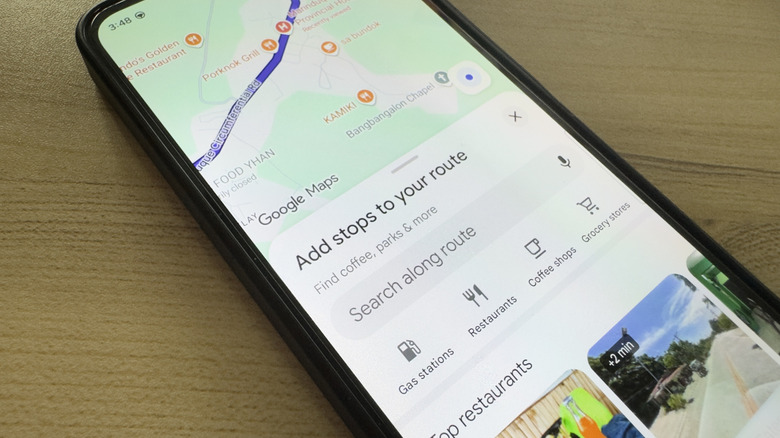
Phone showing Google Maps adding stops to route

Marinel Sigue/BGR

Google Maps is many people’s app of choice when traveling, not just because it’s great for navigation but also because there are hidden Google Maps tools that help users travel more easily. Among those nifty features is route planning and support for stops between your origin and destination. Compared to Waze (another popular app owned by Google), which allows only one stop per trip, Google Maps lets you plan a route with up to nine stops, including your final destination. This makes creating the day’s itinerary much more convenient.

Adding stops to your route on Google Maps is pretty quick and easy, although the option to do so isn’t obvious right away. To start, search for the first location you want to go to in the app. Then, hit Directions to open the navigation route and press Add stops. You should be able to look up another location from the search bar, but feel free to select one of the suggested places too. Once your first stop is added, just rinse and repeat for the rest of your itinerary.

Managing your Google Maps route stops and understanding their limitations
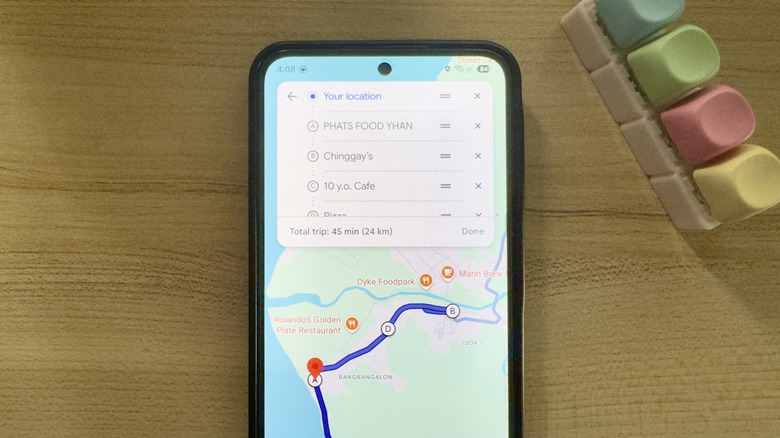
Phone showing Google Maps route planning with stops

Marinel Sigue/BGR

Google Maps’ route planning is flexible, and after setting it up, you can easily delete stops, replace them, or rearrange the entire route to your liking. To remove a specific stop, press the three dots in the upper-right corner of the screen and go to Edit stops. Then, tap the X mark next to it. If you want to replace the stop with a new location instead, tap on the stop and type the new location’s address.

Meanwhile, to reorder all the locations on the route, simply drag and drop the stops to your preferred order. Doing so will change the total trip duration displayed at the bottom. This automatically updates depending on how your stops are arranged. If you hit Done and pull up the Drive panel, you’ll also see how long the trip between each stop will take. If you’re not satisfied with the duration, you can always adjust the sequence of the stops to fit your needs.

The thing is, arranging five or more stops on your Google Maps route will take some time to optimize. You’d have to do some trial and error to get your desired trip duration. Unfortunately, Google Maps doesn’t offer an option for automatic optimization, so you’re stuck with reordering the stops yourself.

Another drawback of Google Maps is its limit of nine stops in total. While it’s great for quick day trips, errand runs, or food crawls in a small area, it isn’t ideal for multi-day travels, road trips, and trips to different cities where you’ll more than likely stop at ten or more locations. In such cases, you’re better off going with a Google Maps alternative.

Alternative navigation apps with route planning for 10+ stops

Phone showing Apple Maps with 13 stops

Marinel Sigue/BGR

If you find Google Maps’s nine-stop routes too limiting, there’s a bunch of other navigation apps that support route planning with more stops. One top example is Apple Maps. It accommodates 13 stops between your starting point and destination, so you get to go to a total of 14 locations from where you’re starting. Just like on Google Maps, you’re also free to rearrange the stops on your Apple Maps route and see how long the total trip will take. The Apple Maps mobile app is exclusive to iOS, though. If you want to use it on Android, you’ll have to settle for using the Apple Maps website on your browser.

If you prefer to stick with an app, Organic Maps, available on Android and iOS, is a solid option. You can plan a route on this app with as many as 100 stops, perfect for when you want to make the most out of the area. When adding stops to your Organic Maps route, you even get a convenient set of categories, such as Where to eat, Hotel, and Sights. This comes in handy when you don’t have a strict itinerary yet and are building one based on what’s in the area. But if you already know where to go, you can still search for a specific location to add as a stop.

Yandex Maps, which you can download on your Android or iOS device, is another fairly popular Google Maps alternative. Instead of just eight locations, you get a total of 18 stops with Yandex, excluding your origin and destination. Other than a higher limit, this app also optimizes the route. It automatically organizes the stops to provide you with the quickest route available.


Share This Article
Email Copy Link Print
Previous Article 4 Smart TVs With The Longest Software Support 4 Smart TVs With The Longest Software Support
Next Article 4 Disadvantages Of Switching From Google Chrome To Firefox 4 Disadvantages Of Switching From Google Chrome To Firefox
Leave a Comment

Leave a ReplyCancel reply

FacebookLike
XFollow
InstagramFollow
LinkedInFollow
MediumFollow
RSS FeedFollow
Most Read
US launches strikes on Iran after Trump vows to deliver ‘beating’

US launches strikes on Iran after Trump vows to deliver ‘beating’

Trump says Hamas has agreed to disarm over time

Trump says Hamas has agreed to disarm over time

The Coldcard Exploit Explained: Who Lost Bitcoin and Who’s at Risk

The Coldcard Exploit Explained: Who Lost Bitcoin and Who’s at Risk

VIRTUAL Price Prediction: Triangle Pattern Signals Potential Rally Above $4

VIRTUAL Price Prediction: Triangle Pattern Signals Potential Rally Above $4

Japan vows to intervene again with US over yen if needed

Japan vows to intervene again with US over yen if needed

Morgan Stanley: America could go into recession before next spring if the US-China trade war escalates

Morgan Stanley: America could go into recession before next spring if the US-China trade war escalates

Beyond Meat drops after Nestle says it’s launching a veggie burger

Beyond Meat drops after Nestle says it’s launching a veggie burger

China is warning its citizens to avoid traveling to the United States due to ‘frequent cases of shootings’

China is warning its citizens to avoid traveling to the United States due to ‘frequent cases of shootings’

The House of Representatives just passed a sweeping immigration reform bill which would provide a pathway to citizenship for DACA recipients

The House of Representatives just passed a sweeping immigration reform bill which would provide a pathway to citizenship for DACA recipients

Huawei has reportedly cut orders to suppliers in a potential sign that it’s already feeling the burn from being blacklisted in the US

Huawei has reportedly cut orders to suppliers in a potential sign that it’s already feeling the burn from being blacklisted in the US

Related News
The AI 2027 Super AI Takeoff Scenario is Tracking to 2028-2032
Gadgets

The AI 2027 Super AI Takeoff Scenario is Tracking to 2028-2032

SabPaisa Partners with AccuKnox for Zero Trust AI-Powered Cloud Security to Secure Its Payments Platform
Gadgets

SabPaisa Partners with AccuKnox for Zero Trust AI-Powered Cloud Security to Secure Its Payments Platform

Dark matter’s secret force does the opposite of what scientists expected
Gadgets

Dark matter’s secret force does the opposite of what scientists expected

Police sirens started with a 19th century French scientist
Gadgets

Police sirens started with a 19th century French scientist

Wildlife center needs 31,725 frozen mice a year
Gadgets

Wildlife center needs 31,725 frozen mice a year

  • Quick Links:
  • SPORTS
  • Business
  • HEALTH
  • NEWS
  • ENTERTAINMENT
  • Virtual Reality
  • WORLD NEWS
  • Gadgets
  • POLITICS
  • News World
  • Travel
  • Tech
  • Global Affairs
  • Africa News
  • Uncategorized
Bioreports
Information You Can Trust: Stay instantly connected with breaking stories and live updates. From politics and technology to entertainment and beyond, we provide real-time coverage you can rely on, making us your dependable source for 24/7 news.
Quick Links
  • Read History
  • Economy
  • Travel
  • Global Security
  • Global Affairs
  • World
  • Technology

© Bioreports News Network. . All Rights Reserved.