Switching operating systems used to be a challenge, like moving to a different country where nobody speaks the same language. That reputation stuck to Linux for decades, but the reality today is completely different. Modern Linux distributions have become so user-friendly that a complete beginner can go years without touching the terminal window on their PC or laptop. The graphical interfaces are polished, the app stores are straightforward, and the days of wrestling with cryptic configuration files are largely behind us. Linux can do things Windows simply can’t, from deep system customization to centralized software repositories that update every installed application with a single click.
The numbers back this up. A 79-year-old with zero Linux experience and a language barrier was able to use Ubuntu without issue, which says more about how far the platform has come than any benchmark ever could. Linux is also more secure, provides far more privacy, and frees users from vendor lock-in, making it a solid alternative. But, enthusiasm without preparation leads to avoidable frustrations, and there’s a handful of classic missteps that trip up new users every time. Here’s five common mistakes to avoid when switching to Linux.
Picking a Distro That Is Too Advanced Instead of Starting Simple
The Linux community is packed with distributions, lovingly named “distros”, and the first thing newcomers encounter is an overwhelming list of options. There’s literally hundreds of Linux distributions, each essentially a different brand built around the same Linux kernel. The mistake many make is diving straight into something like Arch Linux or Gentoo, which are awesome for customization, but the anxiety when booting to nothing but a terminal waiting for a command line is real. Newcomers have no idea where to start.
The smart move for beginners is to go with a distribution designed for ease of use. Linux Mint tops most beginner recommendation lists because its Cinnamon desktop looks and behaves like Windows XP or Windows 7, making it instantly familiar to anyone hopping over from a historical run with Windows. Zorin OS goes even further, offering a layout that mimics Windows 11 out of the box while offering a “Pro” version with additional desktop layouts. Both come with software pre-installed, including LibreOffice for documents, Firefox for browsing, and Thunderbird for email, plus GIMP for graphics editing and VLC for media playback. This is all free, as are the included apps, but the point here is there’s very accessible Linux distributions that are perfect for beginners.
Expecting All Windows Software to Run Without a Hitch
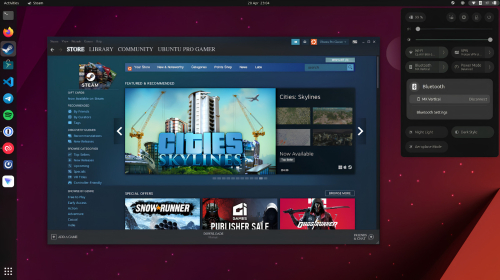
One of the fastest paths to pulling one’s hair out after installing Linux is assuming Adobe Photoshop, Microsoft Office, or a favorite PC game will just work. Linux is not Windows, and while the app ecosystem has grown massively, some software simply doesn’t support Linux. PlayOnLinux and Wine can bridge the gap for certain Windows applications, but compatibility isn’t guaranteed. For those focused on gaming that want to give Bazzite a try, Valve’s Proton compatibility layer built into Steam on Linux is great for getting a gamer’s Windows game library working. The more productive mindset here is to identify solid Linux-native alternatives before making the switch.
The striking thing with Linux alternatives is that many are genuinely capable, and in some cases better. LibreOffice handles documents, spreadsheets, and presentations at a level that’s solid for most users, while GIMP covers image editing and VLC handles media playback. Instead of buying a new machine when Windows leaves an aging computer behind, running Linux can be the cheapest upgrade a laptop or desktop PC ever gets.
The smartest approach for users is to just spend 10 minutes searching for Linux equivalents of key Windows apps before wiping a boot drive. If a specific piece of software is a dealbreaker with no working alternative, dual-booting or taking advantage of a Windows virtual machine alongside WinApps is always an option until a better alternative comes along.
Not Testing With a Live USB Before Committing
There’s a zero-risk way to try Linux without touching the existing operating system, and skipping this step is one of the biggest mistakes a beginner can make when installing Linux for the first time. Nearly every Linux distribution can run directly from a USB stick as a fully functional, live environment, letting users test the interface, check for hardware compatibility issues, and browse the web before making any permanent changes. Nothing gets installed on the hard drive until users hit the install button, and if the Linux distribution doesn’t play nice with a user’s Wi-Fi card or graphics card, it’s picked up before a permanent change is made.
The process is simple enough: Download a distribution ISO file, use a tool like Balena Etcher or Rufus to flash it onto a USB drive, then change the computer’s boot order in BIOS to USB as the primary option. Linux Mint and Zorin OS both install in roughly 10 to 15 minutes when users feel comfortable enough to make a permanent change, complete with installers that guide users through language selection, partitioning, and location settings step by step. Testing multiple distributions on a bootable USB stick before settling on one is quite normal, and gives Linux beginners the peace of mind that their hardware will run when a permanent install has been made.
Assuming the Terminal Is Mandatory for Everyday Tasks
Ahmad Madanie/Getty Images
Go and have a look at a forum and Reddit posts aimed at helping Linux users, and most power users will reply with “open the terminal and type …” That habit, born of the platform’s history (and understandably so), has created a myth that Linux requires memorizing long command lines to get anything done. The reality is that modern Linux distributions are entirely GUI-driven, and a user can go for months or years without ever interacting with terminal commands. Installing software usually happens through a pre-installed app store, system settings live in a control panel, and files are managed through a point-and-click file browser, just like on Windows or MacOS.
That said, it won’t hurt users to learn a few basic terminal commands to make certain tasks dramatically faster than clicking through menus. It’s not necessary, but it’s good to know and will make Linux life more efficient in the long-term. The important thing for beginners to understand is that the terminal is a power tool, not a prerequisite, and Linux was once difficult to get your head around, but that’s in the past. Most Linux distributions work fine without it, and anyone who insists otherwise is either stuck in 2005 or showing off.
Treating Linux Like Windows Instead of Learning the Linux Way
Nguyenducquang/Getty Images
While some Linux distros try to emulate the Windows 11 experience, Linux isn’t Windows, and it’s wise to remember that. The two operating systems have fundamentally different philosophies. Linux offers things Windows simply can’t do, from deep system customization to a fundamentally different approach to software installation through centralized repositories rather than downloading random installers from websites. Fighting the platform by clinging to Windows habits will leave users frustrated, so don’t. Once beginners get their heads around how Linux functions, it opens up different and, in some cases, genuinely better workflows.
For example, Linux package managers mean that updating every piece of software on the system, including applications, happens with a single click rather than downloading various .exe updates and installing drivers and updates individually. The heightened level of security comes from a mandatory account permission model where software can’t install itself in the background without explicit authorization. Linux can also breathe new life into aging hardware when compared to Windows, turning an old and slow laptop into a perfectly usable computer instead of just burning through e-waste. Switching to Linux is about what the platform can do better, not how it can copy the experience Windows is known for today. Even Ubuntu, a bloated Linux distribution by community standards, runs better than Windows.